CRM and ERP Integration: Architecture, Data Ownership, and Reliable Sync
CRM and ERP integration is not about syncing every record in both directions. It is about moving the right customer, order, inventory, and financial data between systems with clear ownership, reliable failure handling, and a model the business can operate.
CRM and ERP integration connects the customer-facing system where sales and support teams manage relationships with the operational system where finance, inventory, fulfillment, and delivery decisions happen. Done well, it gives teams a consistent view of the customer and removes avoidable manual handoffs between selling, delivering, and getting paid.
Done poorly, it creates a more expensive version of the original problem: duplicate accounts, conflicting customer data, orders that fail quietly, inventory that is out of date when a rep needs it, and finance teams reconciling gaps at month-end.
The objective is not to synchronize every field in both directions. It is to define which system owns each type of data, identify the business events worth sharing, and build integrations that remain understandable when an API times out, a record is updated twice, or an upstream system changes.
CRM and ERP Integration at a Glance
| Decision | Practical guidance |
|---|---|
| What should be integrated first? | Start with a high-value operational flow, such as quote-to-order, order-to-invoice, inventory visibility, or credit-status updates. |
| Which system owns customer data? | Usually the CRM owns sales relationship data; the ERP often owns billing, shipping, credit, and financial records. Define ownership field by field where necessary. |
| Should every change sync in real time? | No. Use near-real-time updates when delay creates business risk. Use scheduled batches when freshness is less important than reliability and simplicity. |
| How should integrations handle duplicates? | Use stable source IDs, idempotency checks, matching rules, and a record of the source-to-destination relationship. |
| When is a pre-built connector enough? | When systems, entities, data mappings, and workflows are genuinely standard—and the connector supports the required monitoring and recovery process. |
| When is custom engineering justified? | When the workflow, data model, volume, latency, legacy constraints, or operational controls do not fit an off-the-shelf integration. |
What Is CRM and ERP Integration?
A customer relationship management system, or CRM, helps sales and support teams manage leads, accounts, opportunities, communications, and service history. An enterprise resource planning system, or ERP, manages operational and financial work such as inventory, orders, billing, purchasing, fulfillment, and accounting.
These systems answer different questions. The CRM helps a team understand the customer and the commercial opportunity. The ERP helps the organization understand what it can deliver, what it costs, and what has been billed or paid.
Integration connects those answers without requiring people to re-enter the same facts across multiple applications. A sales rep creates a quote in the CRM. Once accepted, the order moves into the ERP. The ERP confirms inventory, fulfillment, pricing, and credit conditions. Invoice or payment status can then return to the CRM so the account team has the context needed to work with the customer.
The connection itself is rarely the hardest part. The harder question is ownership. If a customer address exists in both systems, which one is authoritative? If an ERP updates a billing contact, should that overwrite the sales-owned contact in the CRM? If the answer is unclear, the integration will eventually create conflicts that someone has to resolve manually.
For organizations with Salesforce at the center of their commercial workflow, our guide to Salesforce integration architecture covers patterns for connecting CRM data to the wider application landscape without creating fragile point-to-point dependencies.
What Business Problems Does CRM–ERP Integration Solve?
The business case for integration should be specific. “A single source of truth” is a useful goal, but it is not a complete project requirement. Identify the operational decision or customer experience that suffers when the systems are disconnected.
- Quote-to-order automation. Approved quotes move from CRM to ERP without re-keying products, quantities, pricing, discounts, delivery information, and customer identifiers.
- Inventory-aware selling. Reps can see availability, lead times, allocation status, or substitute products before committing to delivery expectations.
- Credit-aware order management. ERP-held credit status, overdue balances, or order holds are visible at the right point in the sales process.
- Invoice and payment visibility. Account teams can see whether an invoice was issued, is overdue, or has been paid without asking finance to check another system.
- Service and warranty context. Support teams can connect customer cases to fulfillment history, entitlements, return authorizations, and billing records.
- More dependable forecasting. Sales pipeline data can be considered alongside inventory, delivery capacity, finance, and actual order information.
Not every use case needs real-time integration. An account team may need current credit status before confirming a large order, while a nightly update of low-risk catalog attributes may be entirely adequate. The correct design follows business risk and user needs—not a blanket preference for “real time.”
Define Data Ownership Before Syncing Anything
The most important CRM–ERP integration artifact is often a data ownership matrix. It documents which system creates, updates, and governs each business object or field, plus which system is allowed to consume a copy.
| Data domain | Typical system of record | Integration consideration |
|---|---|---|
| Leads, opportunities, sales activity | CRM | Usually does not need to be copied wholesale into the ERP. |
| Customer relationship contacts | CRM | Requires matching rules when billing and shipping contacts also exist in the ERP. |
| Billing accounts, tax details, credit status | ERP | Selected status should return to the CRM; finance-sensitive fields should have controlled update paths. |
| Products, inventory, fulfillment status | ERP or product-information platform | CRM commonly receives read-only availability or product context. |
| Quotes and negotiated commercial terms | CRM, then ERP after acceptance | Define the exact state transition that transfers ownership. |
| Orders, invoices, payments, credit memos | ERP | Use stable external IDs so CRM users can view status without becoming the source of financial records. |
Ownership does not have to be determined at the object level alone. A customer record may be CRM-owned for relationship details but ERP-owned for tax, billing, legal entity, payment, and credit attributes. The key is to define those boundaries before two systems begin overwriting each other.

For complex organizations, this work often overlaps with data architecture and reporting design. Our data analytics and business intelligence services can help establish the data model, quality controls, and reporting layer needed after the operational integration is in place.
Which CRM–ERP Data Flows Should You Integrate First?
Do not start by syncing every available object. Prioritize flows according to business value, error risk, frequency, volume, and the cost of a delay.
- Accounts and contacts. Establish matching rules, source IDs, and ownership boundaries before treating customer records as shared data.
- Quotes to orders. Define which quote states are eligible to become ERP orders, and validate pricing, product, customer, and delivery data before creating an order.
- Inventory and availability. Surface only the inventory information a CRM user needs. Avoid making the CRM a second inventory system.
- Invoices and payment status. Return relevant financial status to the CRM while keeping the ERP authoritative for posted financial transactions.
- Credit holds and exceptions. Make the commercial impact visible early enough that sales does not promise something operations cannot release.
- Returns, service, and warranty events. Connect service cases to the operational records required to resolve them correctly.
Each flow should have a short specification that identifies the initiating event, source system, destination system, data fields, validation rules, latency target, failure behavior, and business owner. If the team cannot explain a flow on one page, it is not ready for implementation.
Choose the Sync Pattern by Business Risk
A tiered approach usually works better than treating all records the same way. Some events need fast updates because a delay changes a customer-facing or operational decision. Others can be collected and processed in scheduled batches.
| Integration pattern | Good fit | Tradeoff |
|---|---|---|
| Near-real-time event processing | Order creation, payment status, inventory availability, credit holds | More failure paths, dependency management, and monitoring requirements |
| Scheduled batch synchronization | Catalog updates, reporting extracts, historical migration, low-urgency updates | Data is not immediately current; errors may affect multiple records at once |
| On-demand lookup | Occasional operational context such as credit status or order history | Depends on source-system availability at the moment a user needs the data |
| Hybrid model | Most production CRM–ERP environments | Requires clear documentation so teams understand why each flow behaves differently |
For example, inventory availability might require an on-demand query or frequent event-based update, while product descriptions can refresh overnight. A large batch of historical order records may need a controlled migration process rather than a live synchronization path.
This distinction is central to reliable system data synchronization. The goal is not maximum synchronization speed. It is dependable data at the point where the business needs it.
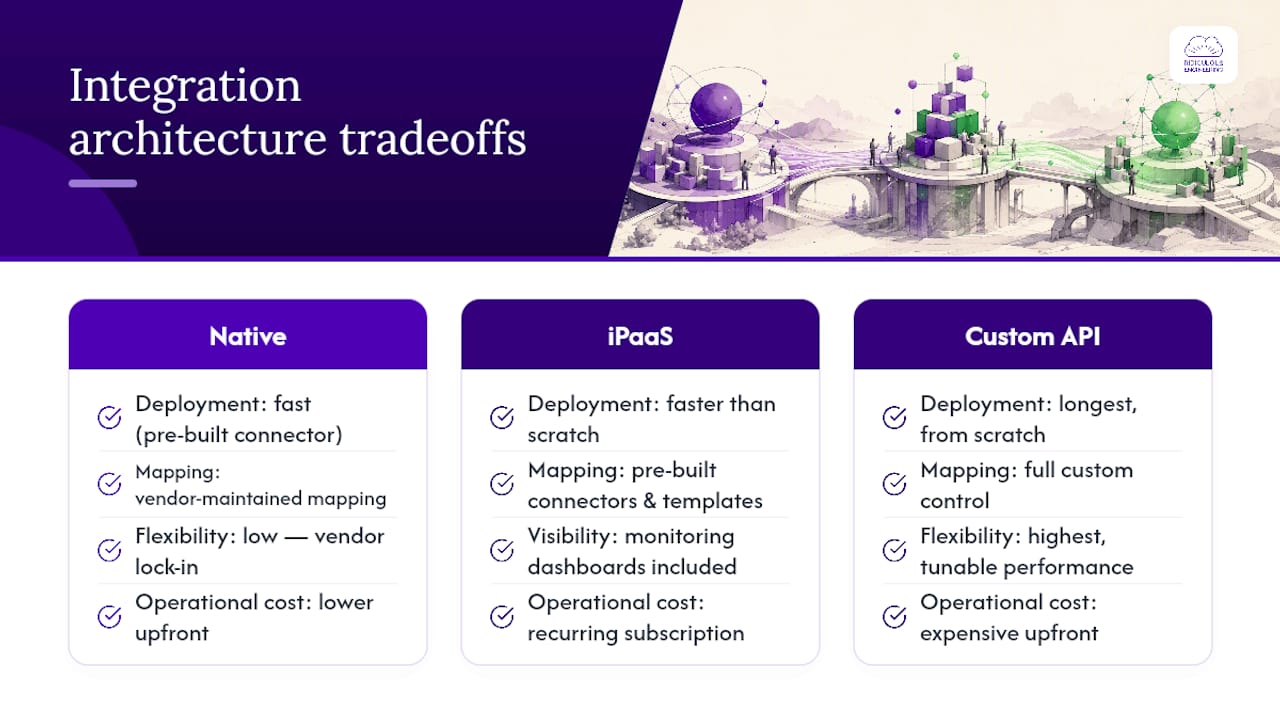
Native Connector, iPaaS, or Custom Integration?
Most CRM–ERP integration programs use one of three broad approaches. The best choice depends on the systems involved, the complexity of the workflow, transaction volume, internal capability, and the level of control required.

Native Connectors
Native connectors and vendor-maintained integrations are a good option when the workflow is standard and the two platforms already support the required objects, entities, transformations, and sync behavior.
They can reduce initial implementation effort, but a connector is not automatically a complete architecture. Before adopting one, assess its handling of duplicate records, partial failures, historical backfills, custom fields, multiple legal entities, pricing, taxes, refunds, credit holds, error visibility, and replay options.
iPaaS and Middleware Platforms
Integration-platform-as-a-service tools and middleware can be useful when an organization connects several SaaS applications, needs central monitoring, or lacks the capacity to develop and operate every connector independently.
They provide connectors, mapping tools, workflow orchestration, and monitoring features. They also become a critical operational dependency. Someone still needs to own credentials, mappings, failure queues, version changes, and the business rules hidden in integration configuration.
Custom Integration Services
Custom integration services are appropriate when the business process is distinctive, transaction volume is high, systems include legacy platforms, or the integration requires tailored transformations, durable queues, strict observability, and versioned testing.
A custom integration layer gives a team greater control over mapping, security, retries, rate limits, and operational behavior. It also requires an explicit commitment to maintain that layer. The right question is not whether custom development is more sophisticated. It is whether the business needs capabilities that standard connectors cannot provide safely or reliably.
Organizations working with SAP should also consider the patterns used across their wider application environment. Our practical guide to SAP integration patterns explains the tradeoffs among direct APIs, asynchronous messaging, IDocs, event-driven architecture, and data-replication approaches.
Reliability Controls That Keep the Integration Trustworthy
CRM–ERP integrations fail in predictable ways: webhook deliveries are repeated, APIs time out, access tokens expire, one system is unavailable, or a mapping changes without the downstream workflow being updated. Production reliability depends on designing for these events rather than treating them as edge cases.

Idempotency and Duplicate Prevention
An integration should be safe to retry. If the CRM sends the same accepted quote event twice, the ERP should not create two orders. If a response is lost after an order is created, the integration should be able to determine whether the destination record already exists before trying again.
Use stable source identifiers, external IDs, or controlled composite keys. Store the relationship between the CRM record and the ERP record it produced. Define matching rules for customer records before duplicates become a cleanup project.
Validation Before Posting
Validate the data that matters before creating a business-critical record. For a quote-to-order workflow, that may include a valid customer ID, product mapping, legal entity, currency, tax treatment, shipping details, order status, and credit conditions.
Validation should return a useful reason when it fails. “Integration error” forces an operations team to investigate from scratch. “Product SKU is not mapped for entity A” gives the responsible person a path to resolution.
Exception Management and Human Review
Some failures can retry automatically. Others require a commercial, operational, or finance decision. A customer with an expired credit limit, an unknown product code, or an order targeting a closed accounting period should not be repeatedly retried until the system gives up.
Build an exception path that shows:
- What failed and why
- The source transaction and relevant identifiers
- Whether the item can retry automatically
- Who owns the correction
- How a corrected transaction is safely replayed
Monitoring and Reconciliation
Technical monitoring asks whether an API request succeeded. Operational monitoring asks whether the intended business outcome occurred.
For example, a quote-to-order integration should be able to answer:
- How many accepted quotes were eligible for ERP order creation?
- How many orders were created successfully?
- How many failed validation or require human review?
- How long does the workflow take from accepted quote to usable ERP order?
- Which source records have no corresponding destination record?
This is why integration work should include dashboards, alerts, traceable transaction logs, and a practical runbook—not just API configuration. The same operational discipline applies to sales order automation, where successful technical execution means little if an order is not actually ready for the next business step.
CRM–ERP Integration Architecture
Need to make a CRM–ERP workflow dependable before it reaches production?
We can help map data ownership, integration patterns, validation rules, failure paths, and the operational controls required to make the workflow supportable.
Explore Consulting and Delivery Support → Talk Through Your Integration →
Security and Permission Boundaries
CRM and ERP integrations often move customer, financial, pricing, fulfillment, and employee-related data. Use dedicated integration identities rather than individual user credentials, grant the smallest permission set that works, and maintain a clear inventory of credentials and connected systems.
Key controls include:
- Dedicated service accounts for each integration or integration environment
- Least-privilege access to objects, fields, and operations
- Managed secrets for API keys, OAuth credentials, and certificates
- Token-expiration monitoring and documented credential-rotation procedures
- Audit logs that connect source events with destination actions
- Data minimization in logs, messages, analytics tools, and error notifications
For modern applications connected to older ERP environments, the integration boundary is often the most sensitive part of the system. Our guide to integrating modern technology with legacy systems covers the architectural and operational work needed to modernize without creating new uncontrolled dependencies.
A Practical CRM–ERP Integration Delivery Plan
Most successful integrations are delivered in phases. That does not mean every project must follow the same calendar. It means each phase should reduce a defined uncertainty before the organization expands the scope.
- Identify the priority business flow. Choose one workflow where integration reduces real operational friction, such as quote-to-order or invoice-status visibility.
- Map the current process. Document the systems, user roles, fields, manual handoffs, approvals, exceptions, and downstream dependencies.
- Define ownership and data contracts. Agree on source-of-truth rules, identifiers, field mappings, transformation rules, validation, and expected outcomes.
- Select the integration pattern. Determine whether the flow requires an API, event, scheduled batch, on-demand lookup, native connector, iPaaS workflow, or custom service.
- Build and test the narrowest useful slice. Test representative records and failure scenarios, including duplicates, unavailable endpoints, invalid mappings, and peak-volume conditions.
- Establish operational controls. Create alerts, dashboards, retry behavior, exception ownership, reconciliation checks, and a runbook before treating the flow as production-ready.
- Expand deliberately. Add subsequent flows only after the first one is stable enough to provide a reusable technical and operational pattern.
This approach lets the organization prove the integration model with a real business workflow before investing in a broad “sync everything” program. It is also a practical use case for software consulting and delivery support when a team needs help aligning business process, systems architecture, delivery planning, and operational ownership.
Build vs. Buy: Use the Operating Model as the Test
A pre-built connector can be the right decision. A custom integration can also be the right decision. Neither is automatically superior.
Choose a connector or iPaaS approach when the required data flows are standard, your systems are well-supported, transformation needs are limited, and the team can operate the vendor platform confidently.
Consider custom integration engineering when your organization has multiple entities, unusual pricing or fulfillment rules, high transaction volume, legacy constraints, complex exception handling, or a product that must support several CRM or ERP platforms.
A hybrid approach is common: use vendor-managed connectivity where it fits, then add a custom service around the workflows that are central to your operating model. This is the same practical decision framework used in business workflow automation: standardize what is truly standard, and build deliberately where the business process is distinctive.
If the remaining scope is CRM-side configuration and marketing automation rather than cross-system integration engineering, Omnivance Media describes services in that area.
CRM–ERP Integrations That Work Beyond the Demo
Ridiculous Engineering helps organizations design and build reliable integration architecture across CRM, ERP, commerce, finance, operations, and legacy platforms. We focus on the work that determines whether the system will be useful in production: ownership rules, data contracts, APIs, asynchronous processing, exception workflows, testing, monitoring, and supportable handover.
That may involve assessing an existing connector, designing a new integration layer, improving a failing synchronization process, or helping a team decide where native tooling ends and custom software should begin.
Practical Integration Planning
Have CRM and ERP data that needs to agree?
Bring the systems, the priority workflow, and a few representative records. We can help determine whether a connector, iPaaS, or custom integration layer fits the operating model.
Explore Custom Software Development → Start a Conversation →
FAQ
What is CRM and ERP integration?
CRM and ERP integration connects customer-facing systems with operational and financial systems. It allows selected customer, quote, order, inventory, fulfillment, invoice, payment, and service data to move between platforms according to defined ownership and business rules.
Which system should be the source of truth?
There is rarely one source of truth for every data type. CRM commonly owns leads, opportunities, and relationship activity. ERP commonly owns financial records, inventory, fulfillment, billing, credit, and accounting data. Define ownership by business object and, where necessary, by field.
Should CRM and ERP data sync in real time?
Only when delay creates a meaningful business risk. Inventory availability, order confirmation, payment status, and credit holds may need fast updates. Catalog information, reporting extracts, and some customer-data updates can often run in scheduled batches.
How do you prevent duplicate orders or customer records?
Use stable identifiers from the source system, external IDs in the destination system, idempotency checks, matching rules, and monitoring that identifies records which did not complete the expected source-to-destination journey.
Can CRM and ERP systems be integrated without replacing either platform?
Yes. Most integrations connect existing systems through native connectors, iPaaS platforms, APIs, events, scheduled jobs, or custom services. The priority is to define a narrow, high-value workflow and establish data ownership before expanding integration scope.