Salesforce Integration: Patterns, APIs, and Architecture Guide
Salesforce Integration: Patterns, APIs, and Architecture Guide The right Salesforce integration approach depends on three things you should nail down before touching a single API: your integration intent (process orchestration, data synchronization, or virtual/zero-copy access...
The right Salesforce integration approach depends on three things you should nail down before touching a single API: your integration intent (process orchestration, data synchronization, or virtual/zero-copy access), your latency requirement (sub-second, near-real-time, or batch), and your data volume. For real-time customer experiences, event-driven patterns using Platform Events or Change Data Capture are usually the right call. For analytics and warehouse access without building a replication pipeline, Data 360 zero-copy is worth serious consideration. For cross-org sync at scale, Bulk API with a middleware layer like MuleSoft Anypoint handles the load without burning through your synchronous API budget.
Before you pick a tool, run this five-question checklist:
- Integration intent: Are you syncing data, orchestrating a process, or federating access to an external source?
- Required latency: Does the business need sub-second, near-real-time (under 15 minutes), or is nightly batch acceptable?
- Data volume: Are you moving hundreds of records or tens of millions?
- Single source of truth: Which system owns each record type, and who wins on conflict?
- API limits: What is your org’s current API consumption, and how much headroom do you have?
Pro Tip: Map only the business-critical flows before choosing technology. The “everything real-time” trap is expensive and usually unnecessary — most business processes tolerate a 15-minute lag just fine, and treating them as streaming problems adds cost and complexity with no measurable benefit.
Key Takeaways
Choosing the right Salesforce integration pattern requires defining your integration intent, latency requirement, and data volume before selecting any API or tool.
| Point | Details |
|---|---|
| Define intent first | Classify each flow as process, data sync, or virtual access before choosing an API or tool. |
| Match API to volume | Use REST for under ~10K records and interactive calls; use Bulk API 2.0 for anything larger. |
| Prefer event-driven over polling | Platform Events and CDC propagate changes efficiently; polling wastes API quota and adds latency. |
| Use Data 360 for warehouse access | Zero-copy federation queries Snowflake, Databricks, Redshift, and BigQuery without replication pipelines. |
| Enforce least privilege and observability | Scope integration users tightly, use Named Credentials, and set API usage alerts before go-live. |
| Ridiculous Engineering | Designs and builds production-grade integration architectures, from API-led design to Data 360 zero-copy and cross-org sync. |
Table of Contents
- What Salesforce integration covers in 2026
- Core integration patterns and how to choose between them
- Which Salesforce API or platform feature fits each integration job
- When to use middleware, Data 360, Heroku Connect, and low-code connectors
- Synchronous vs. asynchronous, event-driven vs. batch, inbound vs. outbound
- Data mapping, transformations, identity resolution, and single source of truth
- Connected apps, OAuth flows, permissions, and integration governance
- API limits, anti-patterns, retries, idempotency, and bulk strategies
- Testing strategy, rollout stages, and what drives integration timelines and cost
- Practical checklist and common pitfalls to avoid
- How Ridiculous Engineering can help with your integration architecture
- Sources
- FAQ
What Salesforce integration covers in 2026
Salesforce integration is the architectural plan and set of tools you use to move, access, and coordinate data and processes between Salesforce and other systems. That definition sounds simple, but the platform has expanded significantly, and the options now span a wide spectrum of intent, timing, and technical complexity.
Three distinct integration intents drive most projects:
- Data synchronization: Replicating or syncing records between Salesforce and an external system so both stay consistent. This includes scheduled ETL, CDC-based incremental sync, and declarative tools like CRM Analytics SyncIn/SyncOut.
- Process integration: Orchestrating business logic across systems, triggering workflows, and coordinating API calls. MuleSoft Anypoint and custom Apex REST services live here.
- Virtual/zero-copy access: Querying external data at runtime without copying it into Salesforce. Salesforce Data 360 and Salesforce Connect are the primary vehicles.
The platform capabilities that matter most in 2026 include:
- REST API for CRUD operations and interactive web/mobile calls
- SOAP API for strongly typed, WSDL-driven integrations with legacy systems
- Bulk API 2.0 for large-volume loads and extracts
- Streaming API and Pub/Sub API for high-throughput event delivery
- Platform Events for decoupled, durable event-driven messaging
- Change Data Capture (CDC) for near-real-time change notifications on Salesforce records
- Salesforce Data 360 (Zero Copy) for federated query access to Snowflake, Databricks, Redshift, and BigQuery
- Salesforce Connect for surfacing external objects without replication
- Heroku Connect for bidirectional sync between Salesforce and Heroku Postgres
- MuleSoft Anypoint for enterprise API management and complex orchestration
The core trade-off running through every decision: lower latency usually means higher complexity and cost. Replication gives you fast local queries but creates drift risk. Federation keeps data fresh but adds query-time latency and dependency on external system availability. Understanding integration strategy choices between federation and replication is often the first real architectural decision on a project.
Core integration patterns and how to choose between them
Architecture patterns are not just academic categories. Each one carries a different maintenance burden, failure surface, and governance model. Picking the wrong pattern early is one of the most expensive mistakes a team can make.
Point-to-point connects two systems directly. It is fast to build and appropriate for a single, stable, low-volume integration. The problem is that it scales poorly: five systems with point-to-point connections means up to ten integration surfaces to maintain, each with its own auth, error handling, and schema coupling.
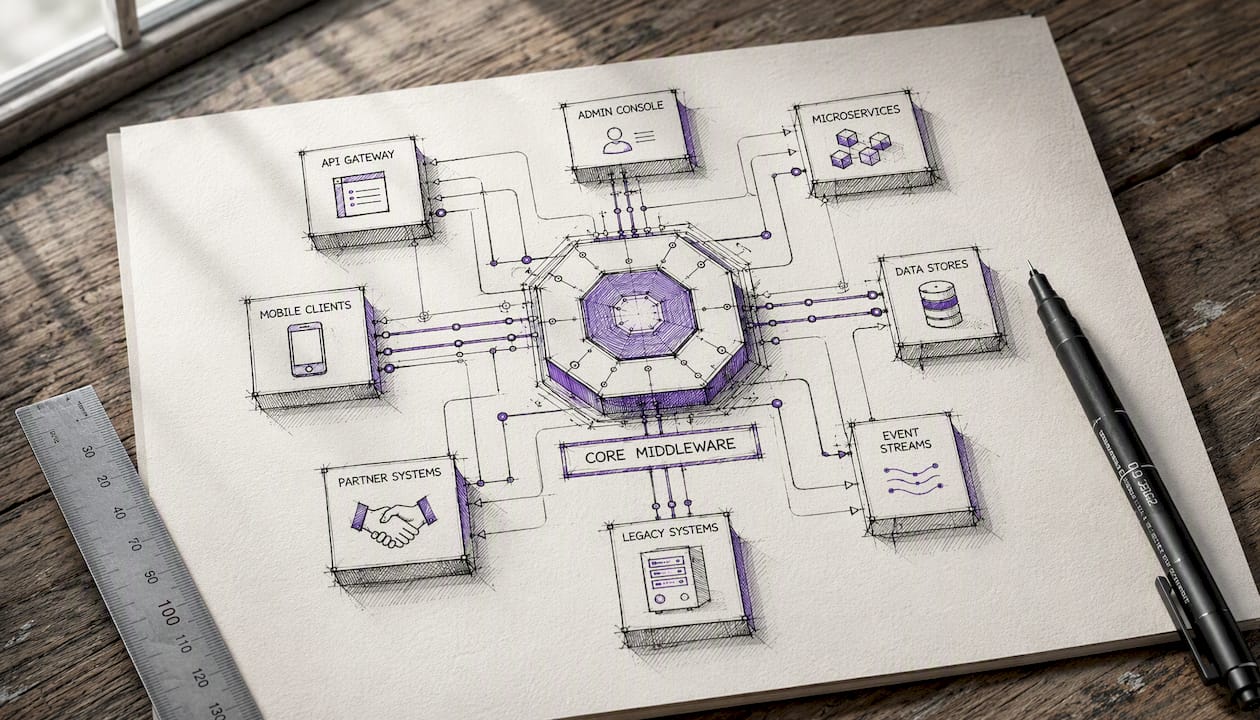
Hub-and-spoke / middleware routes all integrations through a central platform. MuleSoft Anypoint is the canonical example in the Salesforce ecosystem. Every system connects to the hub, which handles transformation, routing, and error handling. This pattern is the right call when you have more than three or four systems exchanging data, when governance and observability matter, or when you need reusable connector libraries.
ESB-style (Enterprise Service Bus) is a variant of hub-and-spoke with a stronger emphasis on message transformation and protocol mediation. It fits organizations with heterogeneous legacy systems that speak different protocols. The trade-off is operational weight: ESBs require dedicated expertise and can become bottlenecks.
API-led connectivity organizes integrations into three tiers: system APIs (expose raw data from each source), process APIs (orchestrate business logic), and experience APIs (tailor responses for specific consumers like mobile apps or portals). MuleSoft’s own methodology formalizes this pattern. It is the most maintainable approach at enterprise scale because each tier can evolve independently.
Virtual/zero-copy federation skips replication entirely. Salesforce Data 360 uses query pushdown and file/query federation modes to query Snowflake, Databricks, Redshift, and BigQuery at runtime. Salesforce Connect does something similar for external objects, surfacing them inside Salesforce without storing them. This pattern is ideal when data freshness matters more than query speed and when the cost of maintaining a replication pipeline outweighs the benefits.
Use this decision trigger list to pick a pattern:
- Number of endpoints: Two or three systems → point-to-point is fine. Four or more → hub or API-led.
- Event volume: High-frequency events (thousands per hour) → event-driven with Pub/Sub or Platform Events.
- Real-time requirement: Sub-second → synchronous API or streaming. Under 15 minutes → CDC or Platform Events. Nightly → batch/Bulk API.
- Owning team: Small team with limited middleware expertise → prefer declarative tools or prebuilt connectors. Dedicated integration team → API-led with MuleSoft.
- Governance needs: Regulated industry or complex audit requirements → hub-and-spoke or API-led with centralized observability.
Pro Tip: Start with small, well-scoped API-led services for your highest-value flows. For many-to-many system topologies, a hub pays for itself quickly in reduced maintenance surface area — the upfront licensing and setup cost is almost always cheaper than the long-term cost of debugging a web of point-to-point connections.
Which Salesforce API or platform feature fits each integration job
Choosing the wrong API is one of the most common sources of technical debt in Salesforce projects. The platform offers multiple API families, each optimized for a specific integration shape.
| API / Feature | Best-fit use case | Sync timing | When to avoid |
|---|---|---|---|
| REST API | CRUD, mobile/web, interactive calls, under ~10K records | Synchronous | Large bulk loads; will exhaust per-org limits fast |
| Bulk API 2.0 | Large loads/extracts (tens of thousands to millions of rows) | Asynchronous | Low-latency needs; not suitable for real-time |
| SOAP API | Legacy ERP integrations, strongly typed WSDL contracts | Synchronous | New projects; REST is simpler and better supported |
| Streaming API / Pub/Sub | High-throughput event delivery, real-time notifications | Streaming | Low-volume use cases; adds complexity for simple needs |
| Platform Events | Decoupled event-driven messaging, cross-system triggers | Near-real-time | When guaranteed delivery order is critical |
| Change Data Capture | Near-real-time change notifications on Salesforce records | Near-real-time | Full-record sync needs; CDC sends field-level deltas only |
| Salesforce Connect | Surfacing external objects without replication | Virtual/query-time | Write-heavy use cases; external system must be highly available |
| Apex REST | Custom endpoints with business logic encapsulation | Synchronous | Standard CRUD; adds maintenance overhead unnecessarily |
| Tooling / Metadata APIs | Deployments, CI/CD, developer tooling | Asynchronous | Production data operations |
For incremental extracts, Salesforce recommends SOAP API’s getUpdated/getDeleted for longer intervals, outbound messaging for moderate frequency, and pagination or Bulk API for large result sets. Mixing strategies based on volume and frequency is the right approach, not picking one mechanism for everything.
Authentication deserves its own attention. For server-to-server integrations, the JWT Bearer flow is the correct choice: it does not require user interaction, supports long-running background processes, and avoids storing user credentials in your integration layer. The username-password OAuth flow is convenient but carries real risk — it bypasses MFA and is deprecated in many org configurations. Use Named Credentials for outbound calls from Salesforce to external systems; they centralize secret management and eliminate hardcoded credentials in Apex code.
For composite operations, the Composite API and Composite Graph API let you batch multiple REST calls into a single HTTP request, which cuts round-trips and reduces API consumption. This is particularly useful for record creation workflows that span multiple related objects.
Pro Tip: If a data job will ever grow past 50,000 rows, start with Bulk API 2.0 from day one. Retrofitting a synchronous REST-based integration to handle bulk volumes mid-project is painful and often requires a full rewrite of the data layer.
When to use middleware, Data 360, Heroku Connect, and low-code connectors
The integration decision guides from Salesforce Architects map tool selection to use case clearly: MuleSoft Anypoint for enterprise API management and orchestration, Heroku Connect for Postgres-backed sync, and Data 360 for harmonized data and analytics-driven access. Here is how each tool fits in practice.
MuleSoft Anypoint is the right choice when you need enterprise-grade API management, a reusable connector library, complex multi-step orchestrations, or centralized observability across many integrations. It handles ERP connections, legacy protocol mediation, and API lifecycle management. The trade-off is licensing cost and the expertise required to operate it well. For a team without MuleSoft experience, the learning curve is real.
Salesforce Data 360 (Zero Copy) lets you query data in Snowflake, Databricks, Redshift, and BigQuery without copying it into Salesforce, using query pushdown and file/query federation modes. This is the right tool when your analytics or personalization use cases need fresh warehouse data and you want to avoid building and maintaining a replication pipeline. It is not the right tool when you need write-back to the warehouse, offline access, or sub-second query response times.
Heroku Connect provides bidirectional sync between Salesforce and a Heroku Postgres database. It is purpose-built for teams running customer-facing applications on Heroku that need access to Salesforce data. Setup is straightforward, and it handles conflict resolution and schema mapping declaratively. Avoid it for heavy bidirectional enterprise sync across many objects — it was designed for app-layer access, not as a general-purpose integration bus.
Salesforce Connect surfaces external objects inside Salesforce at query time using OData or custom adapters. Users see external records in Salesforce without any replication. The catch: the external system must be available every time a user accesses those records, and write operations require the external system to support them. It fits read-heavy reference data scenarios well.
Low-code connectors (AppExchange packages, prebuilt iPaaS connectors in tools like Workato or Boomi) are appropriate for quick, well-defined point integrations where the connector already exists and the data model is simple. They reduce time-to-value but can become a governance liability if proliferated without oversight.
For modern data synchronization, CRM Analytics SyncIn and SyncOut offer declarative, low-code options with CDC-based incremental sync and hard-delete tracking, which avoids the reconciliation gaps that plague naive polling approaches.
Pro Tip: Use Data 360 zero-copy when you need query-time access to warehouse data for personalization or analytics. It eliminates an entire class of pipeline maintenance work and keeps your warehouse as the authoritative source. For commerce and payments scenarios, the integration patterns extend naturally to payment processing flows where data consistency across systems is non-negotiable.
Synchronous vs. asynchronous, event-driven vs. batch, inbound vs. outbound
Mode and direction decisions shape user experience and system reliability more than most teams expect. Getting them wrong means either a sluggish UI waiting on a synchronous call or a business process that reacts to stale data.
Synchronous integrations block the calling process until a response arrives. They are appropriate for low-latency, user-facing operations where the result must be available immediately, such as address validation at checkout or credit check during lead qualification. The risk is that any slowness or failure in the downstream system directly degrades the user experience.
Asynchronous integrations process in the background. The caller gets an acknowledgment and moves on; the result arrives later. This is the right model for most data sync, notification, and workflow-triggering scenarios. It improves resilience because a downstream outage does not block the primary user flow.
Event-driven patterns use Platform Events, Change Data Capture, or the Pub/Sub API to propagate changes as they happen. Platform Events are durable, decoupled, and support replay. CDC fires on Salesforce record changes and delivers field-level deltas, which is far more efficient than polling for full-record changes. The Pub/Sub API handles high-throughput streaming at scale. For commerce personalization scenarios, near-real-time event activation can drive measurable revenue impact when customer signals reach downstream systems quickly.
Batch patterns use scheduled Bulk API jobs or ETL pipelines to move large volumes on a schedule. They are cost-effective, predictable, and appropriate for analytics loads, backfills, and reporting pipelines where a nightly or hourly cadence is acceptable.
Inbound vs. outbound direction matters for auth, error handling, and ownership:
- External → Salesforce (inbound): External systems call Salesforce APIs. Salesforce handles auth via connected apps and OAuth. Rate limits apply on the Salesforce side.
- Salesforce → external (outbound): Salesforce initiates calls via Apex callouts, outbound messaging, or Platform Events. Named Credentials manage the outbound auth.
- Cross-org sync: Two Salesforce orgs exchanging data. Data 360 patterns, Salesforce-to-Salesforce (S2S) connections, or a middleware hub are the common approaches depending on volume and governance needs.
Pro Tip: Prefer event-driven patterns for change propagation where business rules must react quickly — inventory updates, lead routing, case escalation. Reserve batch loads for analytics pipelines and historical backfills where a few hours of lag has no business consequence.
Data mapping, transformations, identity resolution, and single source of truth
A technically correct integration that maps the wrong fields or resolves identity inconsistently will corrupt your CRM data faster than any bug. This is where most integration projects accumulate quiet, expensive debt.
Field-level mapping decisions should answer three questions: what is the canonical data type in each system, where does transformation happen, and who owns the field on conflict. Transforming at the source keeps your integration layer thin but couples it to source schema changes. Transforming in middleware (MuleSoft, a custom service) centralizes the logic but adds a layer to maintain. Transforming inside Salesforce via Apex or Flow works for simple cases but can create performance issues at volume.
Identity resolution is the harder problem. When a customer record exists in Salesforce, your ERP, and your data warehouse, you need a reliable way to match them. The options range from deterministic matching on a shared key (email, account number) to probabilistic matching using Data 360’s identity resolution engine, which handles fuzzy matches across data sources. For most B2B integrations, an External ID field on the Salesforce object is the right starting point: it stores the source system’s primary key, enabling upsert operations without a prior lookup.
Single source of truth decisions are architectural, not technical. Decide which system owns each record type before you build anything. Salesforce might own the Account and Contact, while your ERP owns the Order and Invoice. When both systems can write the same field, you need a conflict resolution rule — last-write-wins, source-system-wins, or a merge strategy — and that rule must be enforced consistently.
Schema drift is inevitable. External systems change their data models, Salesforce releases add or deprecate fields, and integration mappings go stale. Mitigations include:
- Contract tests that validate the shape of API responses against a defined schema on every deployment
- Automated mapping validation that alerts when a source field disappears or changes type
- A documented change-management workflow that requires integration owners to sign off on schema changes before they reach production
Pro Tip: Define your External ID strategy in the discovery phase and enforce it through validation rules and monitoring from day one. Retrofitting identity resolution after data has been loaded from multiple systems without a shared key is one of the most time-consuming reconciliation problems in CRM operations.
Connected apps, OAuth flows, permissions, and integration governance
Security in Salesforce integrations is not just about picking the right OAuth flow. It is about designing a system where every integration surface is auditable, least-privileged, and maintainable over time.
Authentication best practices:
- Use the JWT Bearer flow for server-to-server integrations. It supports non-interactive auth, works with certificates, and does not require storing user credentials.
- Avoid the username-password OAuth flow. It bypasses MFA, is deprecated in many org configurations, and creates a credential management problem.
- Use Named Credentials for all outbound calls from Salesforce. They store credentials securely in the platform, support automatic token refresh, and eliminate hardcoded secrets in Apex.
Authorization and least privilege:
- Never use a System Administrator profile for an integration user. Create a dedicated integration user with a custom profile scoped to exactly the objects and fields the integration needs.
- Use field-level security to restrict access to sensitive fields (SSN, payment data, health information) even when the object-level permission is granted.
- For agentic or AI-driven access patterns, hosted MCP server best practices recommend scoped SObject servers, Named Queries, and accurate tool annotations rather than building custom API wrappers that bypass platform governance.
Audit, monitoring, and observability:
- Enable API usage dashboards and set alerts for unusual consumption spikes. A sudden 10x increase in API calls is often the first sign of a runaway integration or a misconfigured retry loop.
- Log request-level telemetry for all integration calls: timestamp, source system, target object, record count, and response status. This data is invaluable when debugging production incidents.
Governance guardrails:
- Treat your API surface as a product. Document it, version it, and define a deprecation window before removing or changing any endpoint a downstream consumer depends on.
- Require contract tests for every external API your integration consumes. When the external system changes its schema, your CI/CD pipeline should catch it before it reaches production.
Pro Tip: Centralize secrets in Named Credentials or a secrets manager and rotate them on a schedule. The integrations most likely to cause a security incident are the ones where credentials were hardcoded “temporarily” two years ago and never revisited.
API limits, anti-patterns, retries, idempotency, and bulk strategies
Platform limits are not suggestions. Salesforce enforces per-org API call quotas, event delivery limits, and Bulk API concurrency caps. Teams that do not plan for limits before go-live tend to discover them at the worst possible moment.
The most common anti-pattern is chattiness: making a synchronous API call for every record in a high-volume process. A workflow that fires a REST callout for each of 10,000 records processed in a batch will exhaust your daily API quota and likely time out. The fix is batching: aggregate records, use the Composite API to bundle multiple operations per request, or switch to Bulk API 2.0 for the entire job.
Synchronous fan-out is a related problem. When a single Salesforce trigger fires outbound calls to three external systems in sequence, the total latency compounds and any one failure can block the entire transaction. Decouple these calls using Platform Events or a queue-based middleware layer.
Error handling patterns that actually work:
- Exponential backoff with jitter on retries. When a downstream system is throttling or temporarily unavailable, retrying immediately at full speed amplifies the problem. Add randomized delay between retries.
- Idempotent operations. Design every write operation so that running it twice produces the same result as running it once. Use External IDs and upsert operations rather than insert-then-update patterns.
- Dead-letter handling. Failed events that cannot be processed after N retries should land in a dead-letter queue or table for manual review, not silently disappear.
For large result sets, paginate using queryMore for SOQL queries and use the Bulk API’s job-based model for extracts. The Salesforce large data volume best practices guide recommends getUpdated/getDeleted for incremental SOAP-based extracts and Bulk API for large full-load scenarios — mixing strategies by volume is more efficient than applying one approach universally.
Implementing exponential backoff with jitter is a documented best practice for avoiding retry storms that compound throttling events into extended outages.
Pro Tip: Instrument your API usage from the first day in production and set alerts at 70% of your daily quota. Reacting to a limit breach after it happens means downtime. Catching the trend early means you have time to optimize before users notice anything.
Testing strategy, rollout stages, and what drives integration timelines and cost
Integration projects fail in production more often than application projects because the failure modes are distributed across systems, and most teams under-test the boundaries.
Testing checklist:
- Contract tests: Validate that the shape of every external API response matches your integration’s expectations. Run these in CI/CD on every deployment.
- Integration tests: Test the full round-trip between systems in a sandbox environment with representative data volumes.
- End-to-end scenarios: Walk through the business process from trigger to outcome across all connected systems, including error paths.
- Backfill validation: For data sync projects, validate that historical records loaded via Bulk API match the source system on key fields and counts.
- Load tests: Simulate peak volume to confirm you stay within API limits and that latency meets SLA requirements.
Rollout stages:
- Prototype in sandbox: Validate the API connection, auth flow, and basic data mapping. This should take days, not weeks.
- Pilot in full sandbox: Run the integration against a representative data set with real business scenarios. Involve end users.
- Phased production rollout: Enable for a subset of records or users first. Monitor API consumption, error rates, and data quality before full cutover.
- Monitoring and rollback plan: Define what a rollback looks like before you go live. For data sync integrations, this means knowing how to revert records and stop the sync without corrupting both systems.
Timeline and cost drivers:
- Scope of objects and transformations: A single-object sync with a flat mapping can be done in days with a prebuilt connector. A multi-object, multi-system integration with complex transformation logic takes weeks to months.
- Volume and SLA requirements: High-volume, low-latency integrations require more infrastructure, more testing, and more careful limit management.
- Security and compliance approvals: Regulated industries add weeks for security review, penetration testing, and compliance sign-off.
- Licensing: MuleSoft Anypoint and Data 360 carry significant licensing costs that must be factored into the business case early.
Connecting technology adoption to measurable business outcomes is what separates integration projects that get funded from those that stall in procurement.
Pro Tip: Build the minimal viable integration for your highest-value flow first. It validates your architecture assumptions, surfaces the real complexity early, and gives stakeholders something working to react to — which is far more useful than a detailed plan for something that has never run in production.
Practical checklist and common pitfalls to avoid
This checklist is organized by phase. Use it to validate architecture choices and catch the usual traps before they become production incidents.
Discovery phase:
- [ ] Integration intent defined (process, data sync, or virtual access) for each flow
- [ ] Data ownership documented: which system is authoritative for each record type
- [ ] Volume estimates confirmed: peak records per hour, daily totals, and growth projections
- [ ] API limit headroom assessed against current org consumption
- [ ] Latency SLA agreed with business stakeholders for each flow
Design phase:
- [ ] API selected based on volume and latency (REST, Bulk, Streaming, CDC)
- [ ] Auth flow chosen (JWT Bearer preferred for server-to-server)
- [ ] External ID strategy defined and documented
- [ ] Error handling and retry strategy designed (backoff, idempotency, dead-letter)
- [ ] Schema change process and contract test approach agreed
Build phase:
- [ ] Named Credentials used for all outbound auth; no hardcoded secrets
- [ ] Retry logic implemented with exponential backoff and jitter
- [ ] All write operations designed as idempotent upserts where possible
- [ ] Monitoring and alerting configured before go-live, not after
- [ ] Integration user created with least-privilege profile
Operations phase:
- [ ] API usage alerts set at 70% of daily quota
- [ ] Schema change notification process in place for all external APIs consumed
- [ ] Integration runbook written for each production flow (owner, SLA, rollback steps, escalation contacts)
- [ ] Cost monitoring in place for licensed middleware and Data 360 consumption
Common pitfalls:
- Over-privileged integration users with System Admin profiles
- Polling for changes instead of using CDC or Platform Events
- Treating every flow as real-time when the business can tolerate a 15-minute lag
- Insufficient telemetry, making production incidents nearly impossible to diagnose
- Underestimating schema drift from external systems over a 12-month horizon
Connecting modern platforms to legacy systems adds another layer of complexity that deserves its own architectural attention — the patterns for legacy integration often differ significantly from greenfield API-led approaches.
Pro Tip: Require a one-page integration runbook for every production flow before it goes live. It should answer four questions: who owns this flow, what is the SLA, what are the rollback steps, and who do you call at 2 AM when it breaks? If you cannot answer those questions, the integration is not ready for production.
How Ridiculous Engineering can help with your integration architecture
Ridiculous Engineering designs and builds production-grade Salesforce integrations for organizations that need more than a prebuilt connector and a weekend. The work ranges from API-led architecture design and MuleSoft implementation to Data 360 zero-copy planning, cross-org sync strategy, and long-term integration support.
The right time to bring in an experienced team is when the scope crosses into enterprise territory: multiple systems, complex transformation logic, regulated data, or a governance model that needs to hold up over years of Salesforce releases. A poorly designed integration architecture is one of the most expensive things to fix after the fact.
What clients typically get from an initial engagement with Ridiculous Engineering:
- An integration architecture document mapping flows, APIs, patterns, and data ownership
- An External ID and identity resolution strategy
- A security and auth review covering connected apps, OAuth flows, and Named Credentials
- A pilot implementation of the highest-value flow with full monitoring and runbook
- A rollout plan with testing checklist and rollback procedures
If your team is planning a Data 360 zero-copy project, a cross-org sync, or an enterprise API strategy and needs an experienced architecture partner, start with a conversation about what you are trying to build. The discovery call is where the real architectural decisions get made.
Sources
Official Salesforce documentation and architectural decision guides that back the recommendations in this article:
- Extracting data and best practices for large data volumes | Salesforce Developers
- Data Cloud – Zero Copy Connectivity | Salesforce
- Data Integration with Salesforce | Integration Decision Guides
Suggested next steps: Review your org’s current API usage in Setup → API Usage, prototype a minimal flow in a full sandbox using the API that matches your volume, and run the discovery checklist from this article before your next architecture review.
FAQ
What is Salesforce integration?
Salesforce integration is the process of connecting Salesforce to other systems to share data, trigger processes, or provide virtual access to external records. It spans APIs, middleware platforms, event-driven mechanisms, and zero-copy federation tools.
What can Salesforce integrate with?
Salesforce integrates with virtually any system that exposes an API or supports standard data formats, including ERPs like SAP and Oracle, data warehouses like Snowflake and Databricks, marketing platforms, payment processors, and custom applications. Native tools like MuleSoft Anypoint, Heroku Connect, and Data 360 zero-copy cover the most common enterprise integration scenarios.
How much does it cost to integrate with Salesforce?
Cost varies widely. A simple prebuilt connector integration can be configured in days at minimal cost. An enterprise integration involving MuleSoft Anypoint, Data 360 zero-copy, and multi-system orchestration can run from tens of thousands to hundreds of thousands of dollars when licensing, architecture, development, and ongoing support are included. The biggest cost drivers are data volume, transformation complexity, latency requirements, and security/compliance approvals.
How do I choose the right Salesforce integration approach?
Start with your integration intent (process, data sync, or virtual access), your latency requirement, and your data volume. Use REST for interactive, low-volume calls; Bulk API 2.0 for large loads; Platform Events or CDC for event-driven change propagation; and Data 360 zero-copy for analytics and warehouse access without replication. Ridiculous Engineering’s architecture review process maps these decisions to your specific systems and business requirements.
What are the most common Salesforce integration mistakes?
The most frequent problems are over-privileged integration users, polling for changes instead of using CDC or Platform Events, treating every flow as real-time when the business can tolerate a lag, insufficient monitoring, and underestimating schema drift from external systems over time.