Dynamics 365 Integration: A Practical Playbook for IT Leaders
Dynamics 365 Integration: A Practical Playbook for IT Leaders The most effective approach to Dynamics 365 integration starts with a business goal, not a technology choice.
The most effective approach to Dynamics 365 integration starts with a business goal, not a technology choice. Microsoft’s own implementation guidance is explicit: the primary failure mode is integrations that hurt user productivity even when they are technically elegant. The right stack follows from that. Use Dataverse and Power Platform when the integration touches UI, model-driven apps, or low-code process automation. Use Azure Integration Services (Logic Apps, Service Bus, Event Grid) when you need enterprise-scale messaging, complex transformations, or high-volume async workloads. Built-in tools like dual-write and Data Integrator cover specific bidirectional and template-based scenarios between Finance & Operations and Dataverse.
Three decisions to make before you write a line of configuration:
- Platform: Dataverse + dual-write, Data Integrator + Power Automate, or Azure Logic Apps + Service Bus
- Ownership: which system is the authoritative source for each data entity
- Operations: how you will monitor failures, handle retries, and alert before a broken sync halts a business process
The business owner and a solution architect should own the next action together: define the goal, map the data, and run a scoped pilot before committing to a full build.
Key Takeaways
Successful Dynamics 365 integration starts with a defined system of record for every entity and a business goal that justifies the operational cost.
| Point | Details |
|---|---|
| Business goal first | Define latency, volume, ownership, and compliance requirements before choosing a platform or pattern. |
| Platform by scenario | Use Dataverse and Power Platform for UI-coupled and low-code flows; use Azure Logic Apps and Service Bus for high-volume async workloads. |
| System of record is non-negotiable | Assign one authoritative system per entity before development; bidirectional sync without ownership causes data corruption. |
| Monitor before go-live | Build alerting, dead-letter queues, and retry logic into scope from day one, not as post-launch additions. |
| Ridiculous Engineering | Provides architecture, pilot delivery, and production-ready integration builds with operational support built in from the start. |
Table of Contents
- What business goals should drive your Dynamics 365 integration scope?
- Which platform should you choose for your integration scenario?
- How do integration design patterns affect your build and operational risk?
- How do common patterns map to Dynamics 365 capabilities?
- What are the practical rules of thumb for Dataverse, dual-write, Data Integrator, and connectors?
- What operational challenges will sink your integration if you ignore them?
- What does a realistic implementation checklist and timeline look like?
- How do real-world scenarios translate to architecture decisions?
- How should you structure your testing and deployment pipeline?
- Who owns the integration in production, and how do you manage change?
- When should you not integrate at all?
- What are the concrete next steps to start a pilot?
- How your environment strategy affects integration reliability
- What do timeline and cost estimates actually look like in practice?
- How do you manage stakeholder communication during an integration project?
- What version-specific pitfalls should you watch for in Dynamics 365?
- How do you validate data consistency after go-live?
- What is your backup and rollback plan when an integration fails?
- Ridiculous Engineering builds Dynamics 365 integrations that hold up in production
- Sources
- FAQ
What business goals should drive your Dynamics 365 integration scope?
Before any platform discussion, you need a clear answer to what the integration must accomplish. That sounds obvious, but most scope creep and post-launch failures trace back to a vague or shifting answer to this question.
Work through this checklist with your business owner and solution architect:
- Visibility only: Do users just need to see data from another system inside Dynamics 365, without writing back? A reporting layer or Power BI connection may be enough.
- Process automation: Does a business event in one system need to trigger an action in another? That points to Power Automate or Logic Apps.
- Real-time UX: Do users need live, accurate data during a transaction (pricing, inventory, credit limit)? That demands synchronous API calls with tight latency SLAs.
- Bidirectional sync: Do both systems write to the same records? Define the system of record first, or you will create data corruption.
- Compliance and data residency: Does the data cross regulatory boundaries (HIPAA, SOC 2, ITAR)? That changes your authentication, logging, and storage choices.
Translate each goal into a technical requirement before scoping:
- Latency tolerance (milliseconds for real-time, minutes or hours for batch)
- Data volume (records per hour, peak burst rates)
- Ownership (which system wins on conflict)
- SLA for failure recovery (how long can the business tolerate a broken sync?)
- Security scope (who can read and write each entity)
Involve the business process owner, a data steward, and your solution architect from the first conversation. Governance triggers that should escalate to leadership include ROI thresholds above a defined cost, any compliance requirement, and any integration that touches financial records or customer PII. Tying technology to measurable business outcomes from the start prevents the most expensive kind of rework: rebuilding an integration that solved the wrong problem.
Which platform should you choose for your integration scenario?
The platform decision comes down to three variables: how tightly the integration couples to the Dynamics 365 UI, how much data volume you expect, and how much custom transformation logic you need.
Dataverse and Power Platform
Strengths:
- Native to Dynamics 365 apps; model-driven apps and canvas apps connect without custom connectors
- Power Automate provides low-code automation for common triggers (record created, field changed)
- Dataverse tables are the shared data layer for Customer Engagement, Field Service, and Sales
- Virtual tables let external data appear inside Dynamics without physical duplication
Limitations:
- Not designed for high-throughput bulk operations; throttling kicks in at platform API limits
- Complex transformation logic requires premium connectors or custom code
- Less suited for enterprise messaging patterns that need guaranteed delivery and ordering
Azure Integration Services (Logic Apps, Service Bus, Event Grid)
Strengths:
- Handles high-volume, async workloads with durable queuing and dead-letter support
- Logic Apps offers hundreds of connectors and supports complex orchestration
- Service Bus provides enterprise messaging with ordering, sessions, and retry guarantees
- Better fit for multi-system fan-out, long-running workflows, and B2B scenarios
Limitations:
- Higher operational overhead; requires Azure subscription management and monitoring setup
- More expensive at low volumes compared to Power Automate
- Steeper learning curve for teams without Azure experience
When built-in Dynamics tools fit
Data Integrator works well for template-based, point-to-point syncs between Finance & Operations and Dataverse. Dual-write is the right choice when you need tightly coupled, near-real-time bidirectional behavior between those two apps specifically. Neither is a general-purpose integration platform.
| Business outcome | Recommended platform |
|---|---|
| Real-time UI data lookup | Dataverse / Web API (synchronous) |
| Low-code process automation | Power Automate |
| High-volume async sync | Azure Logic Apps + Service Bus |
| Batch ETL / reporting | Data Integrator or Azure Data Factory |
| Bidirectional Finance & Ops ↔ Dataverse | Dual-write |
| Reporting and analytics | Power BI + Dataverse or Azure Synapse |
How do integration design patterns affect your build and operational risk?
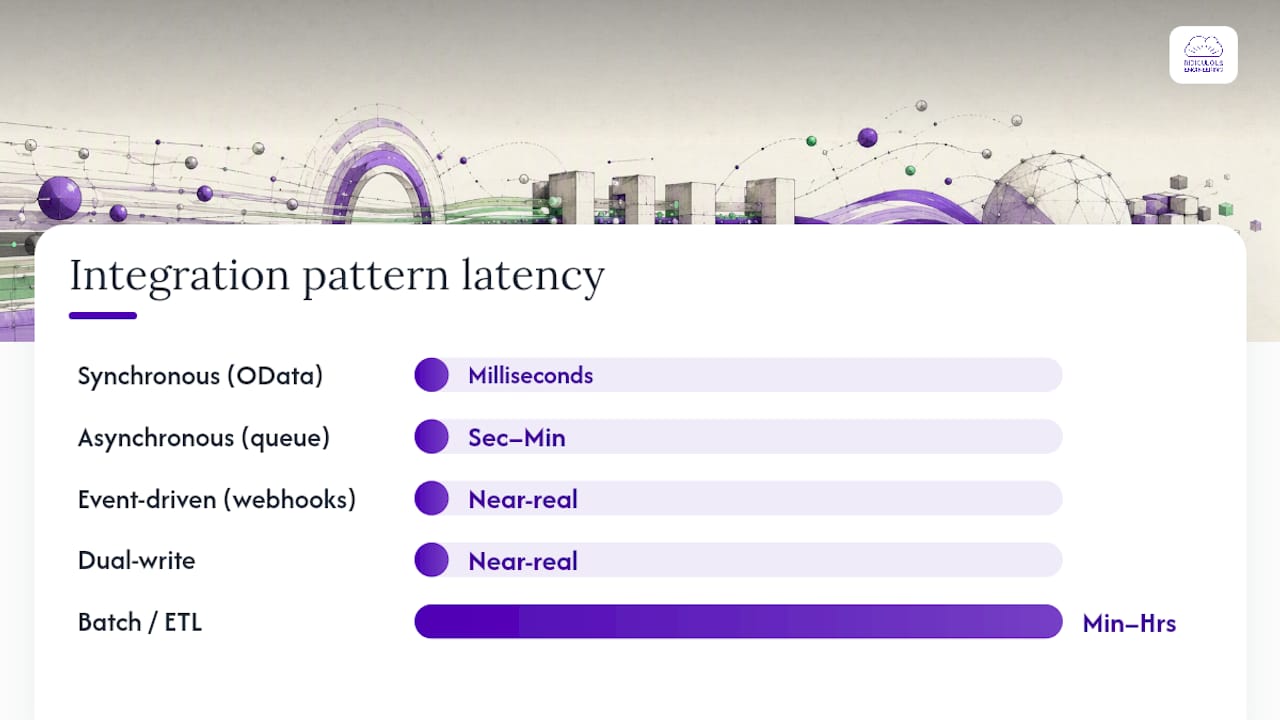
Pattern choice determines how your integration behaves under load, how it recovers from failure, and how much operational complexity you carry in production. Microsoft’s pattern guidance recommends async, queued designs for high-volume workloads and explicit planning for idempotency, batching, and SLA-driven latency.
| Pattern | Trigger | Latency | Idempotency need | Error handling |
|---|---|---|---|---|
| Synchronous (OData / Web API) | User action or API call | Milliseconds | Low (single call) | Caller handles failure inline |
| Asynchronous (queue-based) | Event or schedule | Seconds to minutes | High (duplicate delivery possible) | Dead-letter queue + retry |
| Event-driven (webhooks / Event Grid) | Record change | Near-real-time | High | Retry with backoff |
| Dual-write | Record save | Near-real-time | Managed by platform | Platform-level conflict resolution |
| Batch / ETL | Schedule | Minutes to hours | Medium | Job-level error logs |
Synchronous calls are simple but fragile at scale. A downstream system that is slow or unavailable blocks the calling process. Async patterns decouple the systems and absorb bursts, but they require idempotent message handlers because Service Bus can deliver a message more than once.
Pro Tip: Avoid bidirectional sync as a default. Most integrations only need one system to write; the other reads. Define the system of record for every entity before development starts. Bidirectional sync without clear ownership is the most common cause of data corruption in Dynamics 365 projects.
How do common patterns map to Dynamics 365 capabilities?
Abstract patterns become concrete when you map them to specific Dynamics features. Here is how the most common integration patterns align:
- Virtual tables: Surface external data inside Dataverse without physical replication. Good for read-heavy scenarios where the external system is the system of record. Supported in Dynamics 365 Customer Engagement apps.
- Dual-write: Near-real-time bidirectional sync between Finance & Operations and Dataverse. Use when both apps need to write to the same entity and you can accept the mapping and ownership constraints the platform imposes.
- Data pipelines (Data Integrator / Azure Data Factory): Template-based or custom ETL for bulk moves. Right for nightly syncs, data warehouse loads, and migration scenarios.
- Event-driven webhooks: Dynamics 365 can push notifications on record changes to external endpoints. Combine with Azure Event Grid or Service Bus for durable, fan-out delivery.
- File/CSV staging: Legacy systems often export flat files. Azure Blob Storage plus a Logic App or Data Integrator job can ingest these reliably without custom code.
- API-to-API synchronous lookups: The Dynamics 365 Web API exposes OData endpoints for real-time reads and writes. Use for user-facing transactions where latency matters.
Scenario-to-pattern mapping:
- Prospect-to-Cash: Event-driven (opportunity close triggers invoice creation in Finance & Operations) or dual-write if both apps are in the Microsoft stack
- E-commerce order sync: Async queue (orders land in Service Bus, Logic App writes to Dynamics); commerce platform integrations follow a similar pattern
- Reporting/ETL: Data Integrator or Azure Data Factory batch pipeline to Azure Synapse or Power BI dataset
- External mobile apps: Web API synchronous calls for lookups; async queue for writes to avoid blocking the mobile UX
For event-driven vs polling vs batch: choose event-driven when latency under a minute matters and the source system can push. Choose polling when the source cannot push and volume is low. Choose batch when latency tolerance is hours and volume is high.
What are the practical rules of thumb for Dataverse, dual-write, Data Integrator, and connectors?
Data entities and OData
Data entities abstract the underlying Finance & Operations table schema and expose OData services for synchronous integration. They also support asynchronous bulk import and export via staging tables. Use them for synchronous lookups when a single record read or write is needed; use staging-based import for bulk operations where you can tolerate latency.
One hard limit to know early: data entity string fields cap at 32,768 characters. For long-form text or binary content, plan container fields or route large payloads to Azure Blob Storage. Finding this limit after you have built your mapping is an expensive refactor.
Dual-write
Dual-write is the right tool when Finance & Operations and Dataverse both need to write to the same entity in near-real-time. It forces you to resolve mapping conflicts and ownership questions upfront, which is actually a feature: it surfaces the governance decisions you would otherwise defer until production. Microsoft recommends dual-write specifically for tightly coupled bidirectional scenarios; for looser coupling, Data Integrator or a custom Logic App is less operationally demanding.
Data Integrator
Data Integrator is a template-based, point-to-point service. It works well for standard Prospect-to-Cash and Field Service sync scenarios where Microsoft provides pre-built templates. Its limits show up when you need custom transformation logic or non-standard entity mappings; at that point, Logic Apps or a custom pipeline gives you more control.
Power Automate and Logic Apps connectors
Power Automate connectors for Dynamics 365 are straightforward for record-triggered flows but hit throttling limits under sustained load. Logic Apps connectors offer the same surface area with better retry configuration and integration into Azure Monitor. For workflow automation at enterprise scale, Logic Apps is the more operationally mature choice.
Authentication
All Dynamics 365 API integration uses Azure Active Directory (Azure AD) OAuth 2.0. Register an app in Azure AD, grant it the minimum required Dataverse or Finance & Operations scopes, and use a managed identity or a stored secret in Azure Key Vault. Never embed credentials in configuration files or Logic App parameters in plain text.
What operational challenges will sink your integration if you ignore them?
Error handling
Every integration will fail in production. The question is whether you find out before the business does. Build these into scope from day one:
- Retries with exponential backoff: transient failures (network blips, throttling) resolve themselves if you wait and retry
- Dead-letter queues: messages that fail after maximum retries go to a dead-letter queue for investigation, not into a void
- Idempotent handlers: design message processors so that receiving the same message twice produces the same result
- Alerting: automated monitoring via Azure Monitor or Application Insights with alerts on dead-letter queue depth, failure rates, and latency SLA breaches
Throttling
Priority-based throttling is a real operational risk on OData and custom service integrations. When Dynamics 365 throttles a request, it returns a retry-after header. Synchronous callers that ignore this header will hammer the API and make the problem worse. Use Azure Service Bus as a buffer between your integration client and the Dynamics API so that bursts are absorbed and processed at a sustainable rate.
Performance tuning
Enable change tracking for incremental exports so you only move records that changed since the last run. Skip staging when the data entity supports direct export; staging adds latency and storage overhead. For high-volume imports, configure parallel tasks in the Data Management workspace, but test the parallelism level against your environment’s API limits before going to production.
Security
- Use Azure AD app registrations with least-privilege scopes; never grant global admin to an integration service account
- Store secrets in Azure Key Vault; use managed identities where the platform supports them
- Log all API calls with enough context to reconstruct what changed, when, and by which integration
- Confirm data residency requirements before choosing Azure regions for Service Bus and storage accounts
What does a realistic implementation checklist and timeline look like?
Scoping checklist
- Inventory all source and target data entities with field-level mapping
- Assign a system of record for every entity that will be written by more than one system
- Document compliance requirements (data residency, audit logging, encryption at rest)
- Define error and retry SLAs (maximum retry window, dead-letter review frequency)
- Specify monitoring plan: which metrics trigger alerts, who receives them, and what the escalation path is
- Confirm authentication approach (managed identity, service principal, Key Vault)
- Define acceptance criteria for data consistency post-launch
Typical timelines
- Small pilot (1–2 entities, one-directional, low volume): 4–8 weeks from scoping to production
- Medium integration (3–10 entities, mixed patterns, moderate volume): 3–5 months
- Enterprise-scale project (20+ entities, bidirectional, high volume, compliance requirements): 6–12 months
Primary cost drivers
- Number of custom entity mappings and transformation rules
- Complexity of conflict resolution and bidirectional ownership logic
- Throughput requirements (higher volume means more Azure infrastructure)
- Third-party middleware licenses (Logic Apps consumption vs standard tier)
- Ongoing support: monitoring, incident response, and schema-change management as Dynamics updates roll out
How do real-world scenarios translate to architecture decisions?
Prospect-to-Cash (CRM to Finance & Operations) Opportunity close in Dynamics 365 Sales triggers order creation in Finance & Operations. Recommended pattern: event-driven via Service Bus. Key gotcha: the order entity in Finance & Operations has required fields that Sales does not capture; map defaults or add a validation step before the write. Acceptance test: create a test opportunity, close it, and verify the order appears in Finance & Operations within your latency SLA with all required fields populated.
E-commerce order sync Orders from an external commerce platform land in Service Bus; a Logic App reads and writes to Dynamics 365. Recommended pattern: async queue. Key gotcha: duplicate order IDs if the commerce platform retries on timeout; make the Logic App handler idempotent on order number. Acceptance test: send the same order message twice and confirm only one order record is created.
Sales to Finance reporting Nightly pipeline moves Sales data to Azure Synapse or a Power BI dataset. Recommended pattern: batch ETL via Data Integrator or Azure Data Factory with change tracking enabled. Key gotcha: schema changes in Dynamics after a release update can break the pipeline silently; add schema validation to the pipeline and alert on mismatch.
External mobile app Field technicians need real-time inventory and work order data. Recommended pattern: Web API synchronous reads for lookups; async queue writes for updates. Key gotcha: mobile clients on poor connectivity will time out on synchronous writes; queue the write locally and sync when connectivity returns.
How should you structure your testing and deployment pipeline?
A repeatable deployment pipeline prevents the most common production surprises: configuration drift between environments and secrets that work in sandbox but not in production.
- Environment mapping: maintain separate Dynamics 365 environments for development, test (UAT), and production. Never test against production data.
- Connection sets: use environment-specific connection sets in Data Integrator and Logic Apps so that promoting a solution does not carry development credentials into production.
- Secrets handling: all credentials live in Azure Key Vault; the pipeline retrieves them at runtime. No secrets in source control or ARM templates in plain text.
- Feature flags: use feature flags or environment variables to enable new integration flows in production without a full redeployment.
- Contract tests: validate that the API contract between systems has not changed before deploying. A schema change in a Dynamics entity that breaks a downstream mapping should fail in test, not in production.
- End-to-end test runs: run a full data flow with a representative sample dataset in UAT before promoting to production.
- Volume and stress tests: send peak-volume message bursts to confirm throttling behavior and retry logic work as designed.
- Schema-change resilience tests: simulate a Dynamics update that adds or removes a field; confirm the integration degrades gracefully rather than failing silently.
- Rollback plan: document the steps to disable an integration flow, drain the queue, and restore from a known-good data snapshot if a production deployment corrupts records.
Who owns the integration in production, and how do you manage change?
Ownership ambiguity is where integrations go to die slowly. Define this before go-live.
- Business owner: accountable for the business process the integration supports; approves scope changes and signs off on acceptance criteria
- Data owner: responsible for data quality, field definitions, and system-of-record decisions for each entity
- Integration owner: the technical team or individual responsible for monitoring, incident response, and schema-change coordination
- Escalation path: documented chain from integration owner to business owner to executive sponsor, with SLA for each escalation tier
Change control for mappings and entity schemas should follow a lightweight but formal process: any change to a mapped field or entity requires a change request, a test in the non-production environment, and sign-off from both the data owner and the integration owner. Dynamics 365 releases updates on a regular cadence; the integration owner should review release notes before each wave and flag breaking changes to the business owner at least four weeks before the update reaches production.
A minimal runbook for common incidents should cover three scenarios: throttling (check Service Bus queue depth, confirm retry-after handling, scale out if sustained), schema mismatch (identify the changed field, update the mapping in test, promote after validation), and downstream failure (pause the integration flow, drain the queue to dead-letter, notify the business owner, restore when the downstream system recovers).
When should you not integrate at all?
The honest answer is: more often than most teams expect. Every integration adds a failure mode, a maintenance burden, and an operational cost. Before committing to a build, ask whether the business need could be met by a shared data warehouse, a Power BI report, or a simple export/import process.
Criteria for choosing not to integrate:
- The need is visibility-only and data latency of hours is acceptable; a reporting layer is cheaper and more maintainable
- The two systems share data infrequently (weekly or less); a manual or scheduled export is lower risk than a live integration
- The integration would require maintaining a complex mapping that changes every time either system updates
Operational tradeoffs worth stating plainly:
- More connectors mean more things to monitor and more things to break
- Real-time guarantees cost more in infrastructure and in engineering time than near-real-time or batch
- Bidirectional sync is roughly three times as complex to operate as unidirectional sync, because every conflict needs a resolution rule
Pro Tip: Before scoping an integration, spend 30 minutes asking whether a shared data strategy could meet the need. A well-designed data warehouse with a Power BI layer often delivers more business value than a live integration, at a fraction of the operational cost.
Ridiculous Engineering’s operational advice: scope the smallest integration that meets the business goal, build monitoring and alerting before go-live, use buffer queues for any high-volume flow, and assign strict ownership before the first line of configuration is written.
What are the concrete next steps to start a pilot?
Decision flow
Answer these questions in order:
- Is the need visibility-only with latency tolerance over one hour? Start with Power BI or a reporting layer, not an integration.
- Does the integration touch the Dynamics 365 UI directly? Use Dataverse and Power Platform.
- Is volume above a few thousand records per hour, or does the scenario require guaranteed delivery? Use Azure Logic Apps and Service Bus.
- Do both Finance & Operations and Dataverse need to write to the same entity? Evaluate dual-write.
- Is this a standard Prospect-to-Cash or Field Service scenario? Start with Data Integrator templates.
Pilot checklist
- Define scope: no more than two entities and one data flow direction for a first pilot
- Write success criteria before building: latency target, error rate threshold, data consistency check
- Prepare a sample dataset of at least 1,000 representative records
- Set up monitoring and alerting before the first test run, not after
- Document the rollback plan: how to disable the flow and restore data if the pilot corrupts records
- Get stakeholder sign-off on success criteria before go-live
30/60/90-day milestones
- Day 30: scoping complete, system of record defined, development environment configured, first entity mapped and tested in sandbox
- Day 60: end-to-end test run complete in UAT with sample dataset, monitoring and alerting live, rollback plan documented and tested
- Day 90: production go-live with one data flow, post-launch validation complete, runbook in place, team trained on incident response
How your environment strategy affects integration reliability
The dev/test/prod separation that feels like overhead early in a project is what prevents a configuration change from corrupting production data six months later. Each Dynamics 365 environment should have its own connection sets, its own Azure Key Vault references, and its own monitoring dashboards. Sandbox environments are useful for testing Dynamics wave updates before they hit production; run your integration test suite against the sandbox after each update to catch breaking schema changes before they reach users.
Migration between environments should use solution packages for Logic Apps and Power Automate flows, not manual reconfiguration. Manual reconfiguration introduces drift; solution packages are repeatable and auditable. For Finance & Operations data entities, use the Data Management workspace to export and import configurations as packages.
What do timeline and cost estimates actually look like in practice?
The ranges in the implementation checklist section are starting points, not guarantees. The variables that move the needle most are transformation complexity and the number of systems involved.
A single, unidirectional integration between two well-documented systems with standard entities and no compliance requirements can be scoped, built, and deployed in four to six weeks by an experienced team. Add bidirectional sync, custom entity mappings, and a compliance audit requirement, and the same project runs three to five months. Enterprise projects with 20 or more entities, multiple downstream systems, and high-volume throughput requirements routinely take six months or longer, with ongoing support costs that can equal or exceed the initial build cost annually.
The cost drivers that teams consistently underestimate: ongoing schema-change management as Dynamics updates roll out, the operational cost of monitoring and incident response, and the engineering time required to maintain idempotency logic as business rules evolve. Budget for these explicitly, or they will appear as unplanned work after go-live.
How do you manage stakeholder communication during an integration project?
Integration projects fail stakeholder expectations more often than they fail technically. The gap is almost always communication: business owners do not understand why a “simple” sync takes months, and technical teams do not surface risks until they become crises.
Three practices that close this gap:
- Weekly status updates in plain language: report on what was tested, what passed, what is blocked, and what the next milestone is. No jargon, no acronyms without definitions.
- Risk register visible to business owners: every known risk (throttling limits, schema-change dependency, compliance review timeline) should be visible to the business owner, not just the technical team. Surprises are the enemy of trust.
- Acceptance criteria co-authored by business and IT: when the business owner writes the success criteria alongside the technical team, there are no arguments about whether the integration is “done.” The criteria are the contract.
A marketing automation checklist approach, adapted for integration projects, works well here: document every step, assign an owner, and track completion against a shared timeline. The discipline of a checklist prevents the “we thought you were handling that” conversations that delay go-live.
What version-specific pitfalls should you watch for in Dynamics 365?
Dynamics 365 ships two major release waves per year. Each wave can introduce breaking changes to entity schemas, API behavior, or connector versions. Teams that do not account for this in their integration design end up in reactive firefighting mode twice a year.
The most common pitfalls:
- Deprecated OData endpoints: Microsoft occasionally deprecates older OData entity versions. If your integration targets a specific entity version, pin it and monitor the deprecation timeline.
- Dual-write map version mismatches: dual-write solution maps have their own versioning. After a Dynamics update, verify that your maps are still compatible with the updated entity schema before the update reaches production.
- Power Automate connector version changes: connector actions can change between versions. A flow built on an older connector version may behave differently after an automatic connector update.
- Data entity field additions: new required fields added to an entity in a wave update can break existing import packages that do not supply those fields. Run your import test suite against the sandbox after every wave update.
- Throttling limit changes: Microsoft adjusts service protection API limits periodically. Review the release notes for any changes to throttling thresholds that affect your integration’s throughput assumptions.
How do you validate data consistency after go-live?
Post-launch validation is not a one-time event. Data consistency checks should run continuously, especially in the first 30 days after go-live when edge cases surface.
Build these checks into your monitoring plan:
- Record count reconciliation: compare record counts between source and target on a schedule. A growing gap signals a silent failure.
- Field-level spot checks: sample a percentage of records and compare key fields between systems. Automated spot checks catch transformation bugs that record counts miss.
- Duplicate detection: run Dynamics 365’s built-in duplicate detection rules after bulk imports to catch idempotency failures.
- Business process validation: verify that downstream business processes that depend on the integrated data are producing correct outputs. A technically correct sync that feeds wrong data into a pricing calculation is still a failure.
- Latency monitoring: track the time between a record change in the source system and its appearance in the target. Alert when latency exceeds the SLA defined in scoping.
What is your backup and rollback plan when an integration fails?
Every integration project needs a documented rollback plan before go-live, not after. “We’ll figure it out if something goes wrong” is not a plan.
Practical backup and rollback strategies:
- Snapshot before bulk operations: before any large import or migration, export a snapshot of the affected entities from both systems. Store snapshots in Azure Blob Storage with a retention policy.
- Soft deletes over hard deletes: configure integrations to mark records as inactive rather than deleting them. Deleted records are hard to recover; inactive records are not.
- Queue drain procedure: document the steps to pause an integration flow, drain the in-flight queue to a dead-letter store, and resume after the issue is resolved. Practice this in UAT before go-live.
- Data restore from snapshot: test the restore procedure in a non-production environment. A backup that has never been restored is a backup you cannot trust.
- Incremental rollback: for phased rollouts, design the integration so that individual entity flows can be disabled independently. This lets you roll back a single problematic flow without taking down the entire integration.
Ridiculous Engineering builds Dynamics 365 integrations that hold up in production
Most integration projects do not fail at the architecture stage. They fail at the operational stage: no monitoring, no runbook, no ownership, and no plan for the first time a Dynamics wave update breaks a mapping. Ridiculous Engineering approaches every integration engagement with architecture, implementation, and operational readiness as a single scope, not three separate phases.
The engagement model is straightforward: a discovery session to map your business goals and data entities, a scoped pilot to validate the pattern and platform choice, a production build with monitoring and alerting built in from day one, and ongoing support as your Dynamics environment evolves. Whether you need a single unidirectional sync or a multi-system enterprise integration, the starting point is the same: define the goal, define the system of record, and build the smallest thing that meets the business need.
If you are ready to scope a pilot or want an architecture review of an existing integration, start a conversation with our team. We will tell you honestly what the right approach is, including when the answer is “you don’t need an integration.”
Sources
- integrate-other-solutions
FAQ
Does Dynamics 365 have an API for external integrations?
Yes. Dynamics 365 exposes the Web API, which is an OData v4-compliant REST API, for both Customer Engagement apps and Finance & Operations data entities. Authentication uses Azure Active Directory OAuth 2.0.
Is Dynamics 365 an ERP or a CRM?
Dynamics 365 is both. It is a suite of modular business applications that includes CRM apps (Sales, Customer Service, Field Service) and ERP apps (Finance, Supply Chain Management, Commerce). Many integration projects connect these two sides of the suite using dual-write or Data Integrator.
Is Dynamics 365 integrated with Microsoft Copilot?
Microsoft has embedded Copilot capabilities across Dynamics 365 apps, including Sales, Customer Service, and Finance. Copilot features use the same Dataverse and Azure infrastructure as other integrations, so existing Dataverse integrations generally coexist with Copilot without architectural changes.
What is the biggest risk in a Dynamics 365 integration project?
The most common cause of failure is starting development without a defined system of record for each entity. Bidirectional sync without clear ownership produces data corruption that is difficult and expensive to remediate after go-live.
What will replace Microsoft Dynamics 365?
Microsoft has not announced a replacement for Dynamics 365. The platform continues to receive investment, with Copilot AI features and expanded Dataverse capabilities added in each release wave. Organizations planning long-term integrations should design for the Dataverse and Azure Integration Services stack, which Microsoft is actively expanding.