Replace Spreadsheets: A Migration Playbook for Ops Leaders
Replace Spreadsheets: A Migration Playbook for Ops Leaders The fastest path to replace spreadsheets is to stop treating them as your system of record and move critical data into a single live source: a low-code relational platform for moderate complexity, or a custom internal...
The fastest path to replace spreadsheets is to stop treating them as your system of record and move critical data into a single live source: a low-code relational platform for moderate complexity, or a custom internal app backed by PostgreSQL or SQL Server when the stakes are higher. Either path gets you off files that live in email threads and onto a database that supports real access controls, audit trails, and automation.
The evidence for making this move is direct. Enterprises that shift spreadsheet workflows into low-code internal apps report fewer sync conflicts, better data integrity, and data that’s actually usable for AI-driven workflows, since automation depends on structured, relational data rather than scattered tabs. Gartner has tracked low-code adoption becoming the default foundation for new business applications, not the exception.
Your next move doesn’t require a six-month project plan. It requires:
-
Picking one spreadsheet your team can’t afford to keep breaking
-
Exporting it as a CSV to see what the data actually looks like
-
Scheduling a two-hour scoping session with stakeholders, or with a team like Ridiculousengineering, to map what a real replacement would take
Key Takeaways
Replacing spreadsheets with a low-code platform or a custom internal app on a relational database is the most reliable way to fix version chaos, restore auditability, and prepare data for automation.
| Point | Details |
|---|---|
| Spreadsheets fail structurally | Flat files lack relationships, enforced data types, and real audit trails once multiple teams depend on them. |
| Pick a category, not a vendor | Choose between spreadsheet hybrids, low-code platforms, custom apps, or hosted databases based on data complexity. |
| Follow a sequenced migration | Inventory, clean, model, migrate, rebuild logic, test, and roll out in phases rather than all at once. |
| Rebuild governance deliberately | Role-based access, immutable audit logs, and encrypted backups replace what spreadsheet files never had. |
| Ridiculousengineering scopes before building | Discovery, schema design, and a working pilot come before any full migration commitment. |
Table of Contents
-
How to Replace a Spreadsheet: A Step-by-Step Migration Checklist
-
How Ridiculous Engineering Can Help You Move Off Spreadsheets
Why Spreadsheets Stop Scaling for Growing Teams
Spreadsheets don’t fail all at once. They fail in layers, and each layer makes the next one worse.
Version chaos is usually first. Someone emails “Budget_FINAL_v3_ACTUAL.xlsx” and three people edit different copies before lunch. Manual reconciliation follows: someone spends every Friday afternoon comparing tabs that should already match. Formulas get fragile as they age. A dropped column reference or an accidentally overwritten cell can silently corrupt a model for weeks before anyone notices.
Then there’s the structural problem. Spreadsheets are flat files pretending to be databases. They have no real concept of relationships between records, no enforced data types, and no way to prevent someone from typing “N/A” into a column that expects a date. Microsoft Access, the classic step-up tool, still caps out at 2 GB per database and roughly 255 concurrent connections, which becomes a real ceiling the moment a team outgrows a single department.
Performance degrades in parallel. Once a workbook has tens of thousands of rows and a dozen cross-referencing tabs, even opening the file becomes a coffee break. Reporting APIs built on top of spreadsheet exports choke on datasets they were never designed to handle.
A single mistyped formula or an overwritten macro can silence an entire reporting pipeline for days, and nobody finds out until a customer asks why their shipment never left the warehouse.
None of this means spreadsheets are worthless. They’re still the right tool for a one-off analysis, a quick prototype, or a personal scratchpad. The problem starts when a spreadsheet becomes the system multiple teams depend on for decisions, compliance, or customer-facing data. That’s the point to retire it.
Realistic Approaches to Replacing Spreadsheets
There’s no single “spreadsheet killer.” There are five categories of replacement, and picking the right one depends on your data’s complexity and how much engineering effort you’re willing to invest.
Modern spreadsheet hybrids. Tools like Google Sheets sit closer to spreadsheets than databases, but they solve the version chaos problem with real-time collaboration and change history. They’re a reasonable interim step, not a destination, for teams that need something better than email attachments tomorrow morning.
No-code and low-code relational platforms. Airtable, Coda, and Baserow put a spreadsheet-like interface on top of an actual relational structure. You get linked records, views, and automation without writing SQL. These fit teams that have outgrown flat files but don’t have engineering bandwidth for a fully custom build. Notion occupies a similar space, though it leans more toward document-and-database hybrids than pure relational modeling.
Custom internal apps on a real database. When workflows get genuinely complex, purpose-built applications on PostgreSQL or SQL Server give you full control over business logic, validation, and integrations. This is the heaviest lift and the most durable outcome. It’s the right call when a spreadsheet is driving production decisions, financial reporting, or anything with compliance exposure.
Hosted databases plus BI and reporting. Pairing SQL Server or PostgreSQL with Power BI separates the concerns cleanly: the database handles storage and integrity, the BI layer handles dashboards and analysis. This is a common landing spot for finance and operations teams that need governed reporting without building a full application.
Automation and orchestration layers. Zapier and similar tools don’t replace the data store, but they connect your new system to the other tools your team already uses, so data doesn’t need manual re-entry across platforms.
Here’s what to expect from any solid replacement, regardless of category:
-
Relational structure that enforces data types and relationships instead of trusting cell formatting
-
Role-based access control down to the record or field level
-
Automation that fires on data changes instead of relying on someone remembering to update a tab
-
Native integrations with the tools your team already runs
-
An audit trail that survives someone leaving the company
Pro Tip: Before you touch any tooling decision, pick one canonical dataset and map its primary keys first. Teams that skip this step end up with three “sources of truth” instead of one, which is the exact problem they were trying to fix.
How to Replace a Spreadsheet: A Step-by-Step Migration Checklist
Replacing a spreadsheet isn’t a weekend project, but it also doesn’t need to be an eighteen-month initiative. Here’s the sequence that works.
-
Inventory and risk-rate every spreadsheet in scope. Note who owns it, who touches it, and what breaks downstream if it goes down for a day.
-
Profile and clean the data. Look for inconsistent formats, duplicate records, and orphaned references before you design anything. This step almost always takes longer than people expect.
-
Define your schema and primary keys. Decide what a “record” actually is before you decide what software will hold it.
-
Handle the export and import mechanics. For flat spreadsheet files, this usually means a straightforward CSV bulk upload into the new platform. For Microsoft Access databases, Microsoft’s SQL Server Migration Assistant converts tables, keys, indexes, and many constraints directly, though forms, reports, and VBA modules are not converted automatically and need to be rebuilt.
-
Convert formulas and business logic into database queries or application logic rather than porting spreadsheet formulas verbatim.
-
Build access controls and audit logging before real users touch the system, not after.
-
Test with actual end users, not just the project team, and watch where they get stuck.
-
Roll out in phases, starting with the lowest-risk team or workflow.
-
Monitor usage and data quality for the first few weeks and fix what breaks quickly.
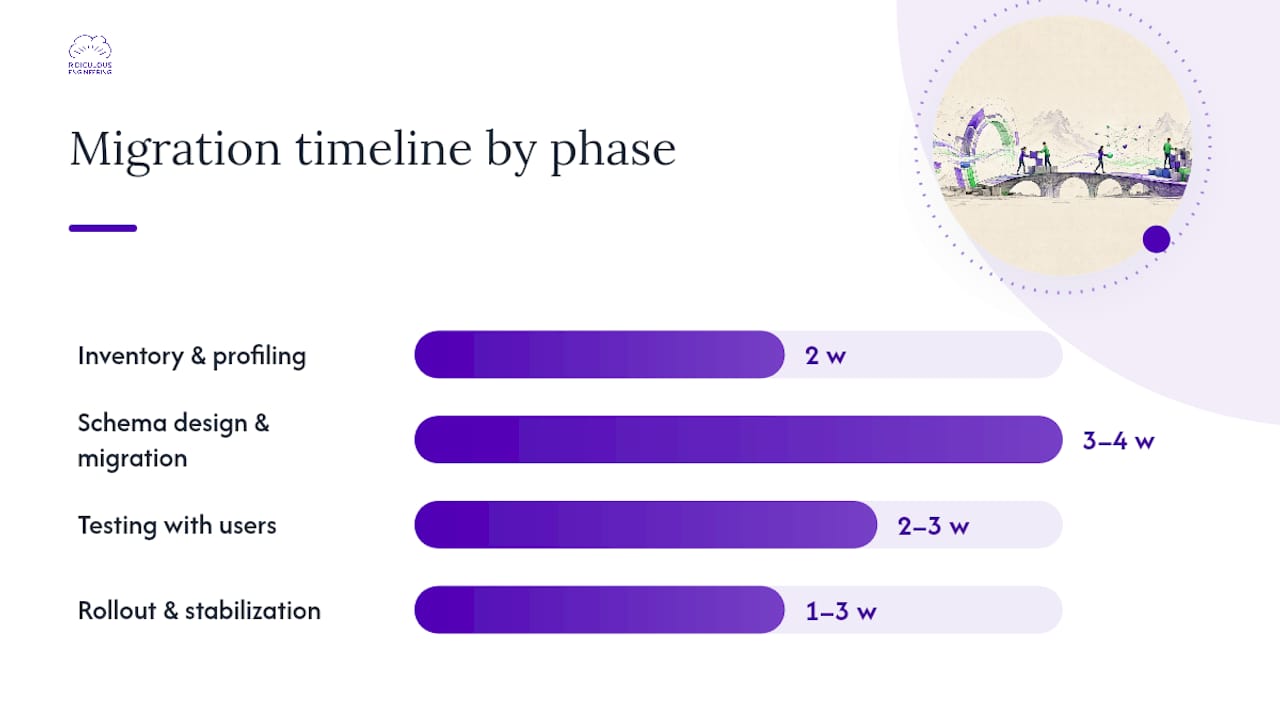
A realistic timeline for a mid-complexity migration runs about 8 to 12 weeks: two weeks for inventory and data profiling, three to four weeks for schema design and migration, two to three weeks for testing, and the remainder for phased rollout and stabilization. Assign a business owner who understands the workflow, a data steward who owns data quality, an engineer for the build, a QA lead, and someone accountable for rollout communication.
For each phase, match the tool to the job: data profilers for the inventory step, ETL or bulk-load utilities for migration, low-code app builders or custom development for the interface, and BI tools for reporting. If Access is involved, SSMA’s guided workflow handles the schema and data conversion, but it requires specific SQL Server role memberships and someone who knows what “db_ddladmin” means. That’s usually the point where a dedicated engineering partner earns its keep.
Pro Tip: Take an immutable backup of every source spreadsheet or database before any write migration begins. “Immutable” means nobody, including you, can edit it. You’ll thank yourself the first time a mapping error corrupts a table.
Governance, Security, and the Auditability You’re Missing
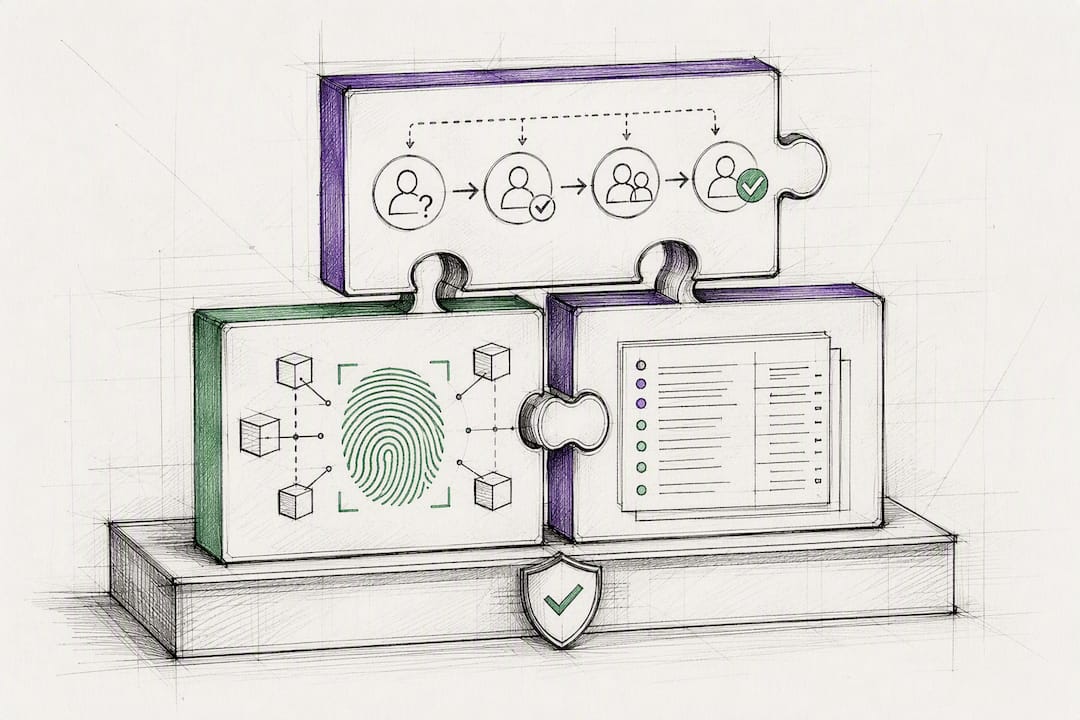
Spreadsheets create governance gaps that most teams don’t notice until an audit or a security review forces the issue. File-level permissions are all-or-nothing: someone either can open the file or they can’t, with no way to let a finance analyst edit revenue figures while blocking them from payroll data in the same workbook. There’s no real audit trail beyond “track changes,” which anyone can turn off. And backups are usually whatever landed in someone’s downloads folder last Tuesday.
Restoring real governance means rebuilding these controls deliberately:
-
Role-based access control that limits permissions by record, field, or workflow stage
-
Immutable audit logs that record who changed what, and when, without an option to disable them
-
Multi-factor authentication on every account with write access
-
Encryption at rest and in transit for anything containing financial or personal data
-
Automated backups with a defined retention policy, not a folder of manual exports
-
Least-privilege service accounts for any automation that touches the database
Some platforms already demonstrate what this looks like in practice. Collaborative document tools that support section-level permissions let an owner grant edit access to one section of a document while restricting others to view-only, which is the same principle a database applies at the table or row level through role memberships and centralized identity management. Compare that to a spreadsheet file, which has no concept of a “section” at all, only a whole document that’s either shared or not.
If a full migration isn’t feasible right away, a governance layer added directly to spreadsheets can buy time. Approval workflows, version fingerprints, and centralized change logs can make a regulated model auditable without a rebuild, which matters for teams under compliance pressure who can’t wait a full quarter for a new system. Migrations that fully centralize data, though, tend to eliminate a larger share of manual reconciliation than governance layers alone.
Pro Tip: Before migrating a single production workflow, test your permission model against a small, low-stakes dataset first. Watch what a normal user can see, edit, and export, then check whether the audit log actually captures it. Fixing a permission gap on ten test records is cheap. Fixing it after go-live is not.
How to Choose the Right Replacement for Your Team
Match the solution to your actual constraints, not the one your last vendor demo made look easiest.
-
Assess your scale. A single team tracking inventory needs less than a company running finance across five departments.
-
Map your data model’s complexity. Flat, single-table data fits a low-code platform. Data with real relationships (customers to orders to shipments) needs a relational database.
-
Check your regulatory exposure. Anything touching financial reporting, healthcare data, or personal information needs auditability from day one, not bolted on later.
-
Count your maintenance headcount. A custom app with no one to maintain it becomes tomorrow’s legacy spreadsheet.
-
Confirm integration requirements. If you need to connect to five other systems, weigh that against each platform’s native connector support.
Three quick scenarios: a small ops team tracking vendor contracts is well served by a modern spreadsheet hybrid or a lightweight no-code platform, often live within days. A team with genuinely relational needs, like project tracking across clients and deliverables, fits a low-code relational platform, typically a few weeks to production. A production-critical financial model with heavy downstream integrations belongs on a custom internal app backed by SQL Server or PostgreSQL, which runs a longer timeline but pays off in control and durability.
An Engineering-First Approach to Replacing Spreadsheets
Ridiculousengineering approaches spreadsheet replacement the way any solid engineering team should: scope first, build small, prove it, then scale it.
A representative engagement runs like this:
-
Discovery. We sit down with the people who actually use the spreadsheet daily, not just the manager who requested the project, and map what the data really needs to do.
-
Schema design. We define the relational structure and access model before writing a line of application code.
-
Prototype. A working pilot with real (or realistic) data goes in front of users early, so problems surface before the whole system is built around a wrong assumption.
-
Migration. Data moves in with validation checks at every step, not a single big bulk import that nobody reviews.
-
QA. Actual end users test the system doing their actual jobs, not a scripted demo.
-
Rollout and monitoring. We phase the launch and watch data quality and usage closely for the first several weeks.
A typical timeline runs two weeks for discovery, another four for prototype and migration, and six to twelve weeks for rollout and stabilization, depending on scope. Clients should expect measurable outcomes: less time spent reconciling numbers by hand, fewer manual edits creating downstream errors, faster reporting cycles, and an audit trail that actually holds up under scrutiny. Every engagement includes transparent scoping up front and knowledge transfer at the end, so the system doesn’t become a black box the moment the project wraps.
How Ridiculous Engineering Can Help You Move Off Spreadsheets
If you’ve read this far, you already know replacing a spreadsheet isn’t about buying software. It’s about getting the data model right, building real access controls, and making sure the people who use the system every day actually trust it.
Ridiculousengineering runs a low-commitment discovery process before any commitment to a full build: a scoping session, a look at your actual data, and a straight answer on whether a low-code platform or a custom internal app is the right fit. You’ll walk away with a migration plan, a rough cost estimate, and in many cases a working pilot app, not just a slide deck. From there, expect technical scoping, hands-on data profiling, and a delivery plan with real milestones, not vague promises about “modernization.”
If a spreadsheet is currently running a piece of your business you can’t afford to keep patching, start a custom software development conversation with our team and get a concrete scope and timeline back, not another sales call.
Sources
A few resources are worth bookmarking before you start scoping your own migration:
-
Connecting to SQL Server (AccessToSQL) - SQL Server | Microsoft Learn
-
How Enterprises Replace Spreadsheets with Low-Code Internal Apps in 2026
FAQ
What are some good alternatives to Excel for spreadsheets?
Airtable, Coda, Baserow, and Notion offer spreadsheet-like interfaces backed by relational structure, while Google Sheets works as a collaborative interim step. For production-critical data, pairing PostgreSQL or SQL Server with Power BI gives you a governed database and reporting layer instead of a flat file.
How do I replace a spreadsheet?
Start by inventorying the spreadsheet’s risk and usage, then profile and clean the data before defining a schema with clear primary keys. Migrate the data, rebuild formulas as database logic or application code, test with real users, and roll out in phases while keeping an immutable backup of the original file.
What is going to replace Excel?
No single tool replaces Excel across every use case. Most organizations move critical workflows to a mix of low-code relational platforms, custom internal apps on SQL Server or PostgreSQL, and BI tools like Power BI, while keeping Excel or Google Sheets for quick, low-stakes analysis.
Is there a free version of Excel spreadsheets?
Yes. LibreOffice Calc offers a free, open-source spreadsheet interface, and Google Sheets is free for individual and small-team use. Neither includes the relational structure, enterprise access controls, or audit trails needed once a spreadsheet becomes a system multiple teams depend on.