Cloud Migration Strategy: Your 2026 Planning Guide
Cloud Migration Strategy: Your 2026 Planning Guide A cloud migration strategy is a documented plan for moving applications, data, and infrastructure from on-premises or legacy environments to cloud platforms, using the industry-standard 7 Rs framework to select the right appro...
A cloud migration strategy is a documented plan for moving applications, data, and infrastructure from on-premises or legacy environments to cloud platforms, using the industry-standard 7 Rs framework to select the right approach for each workload. The 7 Rs are: rehost, replatform, refactor, repurchase, relocate, retire, and retain. Each carries a distinct tradeoff between speed, cost, and how much cloud-native value you actually unlock.
Without a deliberate plan, migrations tend to produce exactly what you were trying to escape: sprawling infrastructure, unpredictable costs, and systems that are harder to maintain than what you started with. The 7 Rs give teams a shared vocabulary for making workload decisions that connect directly to business goals.
What is a cloud migration strategy, and which of the 7 Rs fits your workload?
The 7 Rs sit on a spectrum from minimal change to full redevelopment. Here is what each one means in practice:
- Rehost (lift and shift): Move workloads to the cloud as-is, with no code changes. Fastest path to the cloud, lowest upfront effort, but you leave most cloud-native efficiency on the table.
- Replatform (lift and optimize): Make targeted adjustments, such as moving to managed databases or containers, without rewriting the application. Good middle ground for reducing infrastructure overhead with moderate effort.
- Refactor (move and improve): Re-engineer the application to be cloud-native, often breaking monoliths into microservices. Highest modernization potential, highest complexity and risk.
- Repurchase (drop and shop): Replace a custom or on-premises application with a SaaS equivalent, such as moving from an on-premises CRM to a cloud-hosted platform. Simpler from an engineering standpoint, but you trade control for convenience.
- Relocate: Hypervisor-level lift and shift, typically moving VMware workloads to a cloud version of the same platform, such as VMware Cloud on AWS. Useful for bulk server migrations with minimal reconfiguration.
- Retire: Decommission workloads that no longer deliver business value. Every application you turn off is one you do not have to migrate, test, or support.
- Retain: Keep workloads on-premises when regulatory constraints, recent capital investment, or technical dependencies make migration impractical right now. Azure Arc and similar tools let you manage retained workloads from the cloud console.
AWS, Google Cloud, and Microsoft Azure all publish prescriptive guidance built around this taxonomy. The AWS Well-Architected Migration Lens focuses specifically on rehost, relocate, replatform, and retire as the primary execution strategies, while treating refactor as a separate modernization track. Most real-world migration portfolios use several Rs simultaneously, grouping workloads by complexity and business criticality rather than applying a single approach across the board.
How the cloud migration process actually works, phase by phase
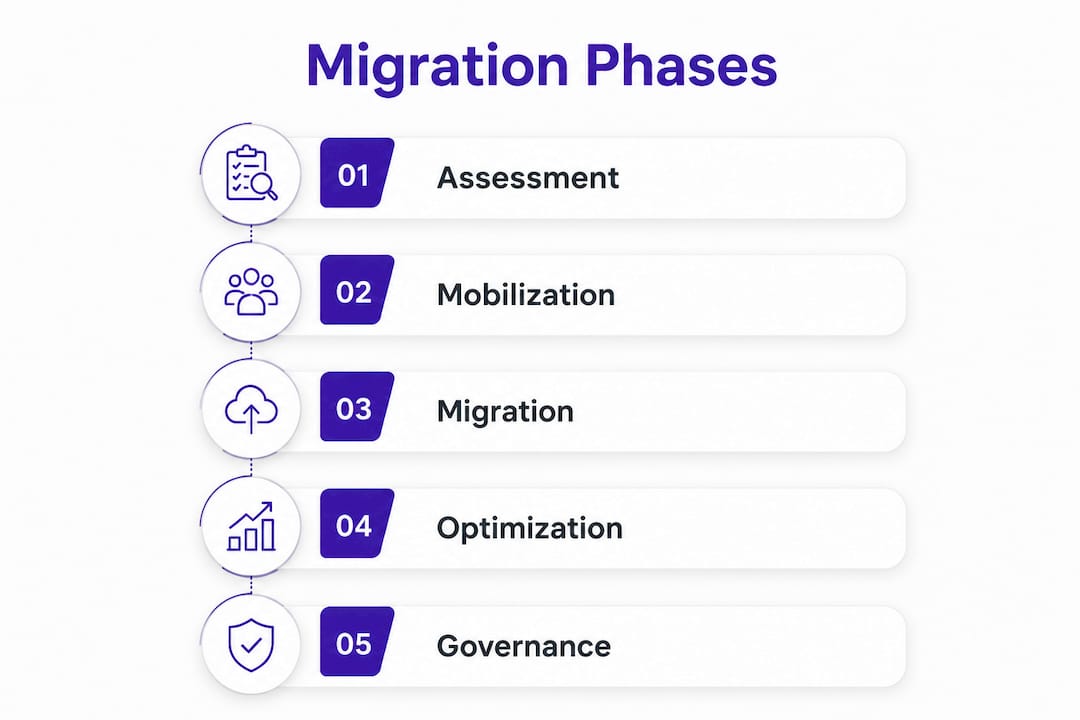
A well-run migration follows four phases. Skipping or rushing any of them is where projects go sideways.
-
Assessment. Inventory every workload, map dependencies, classify business criticality, and build the migration business case. This phase produces the data that drives every downstream decision. The AWS Cloud Adoption Framework structures readiness across six perspectives: business, people, governance, platform, security, and operations. Google Cloud’s guidance adds a specific check on downtime tolerance, clustering support, and failure modes for each workload before you commit to a migration method.
-
Mobilization. Build the foundation before you move anything at scale. This means establishing a secure cloud landing zone, defining governance policies, standing up a Cloud Center of Excellence (CCoE), identifying skills gaps, and running a pilot migration with a small set of non-critical applications. The mobilize phase is where you prove your processes work before you bet production systems on them. Teams that skip mobilization often discover their tooling, IAM policies, and network configurations are not ready when they are already mid-migration.
-
Migration and modernization. Execute workload transfers in sequenced waves, starting with simpler or non-production environments to build confidence and refine processes before touching critical systems. Each wave should include testing, validation, and a defined rollback trigger. The AWS Migration Acceleration Program (MAP) provides tooling, partner support, and a repeatable factory model for organizations moving large portfolios.
-
Optimization. Migration is not the finish line. Cloud migration is an ongoing modernization cycle, not a one-time project. Post-migration work includes rightsizing instances, implementing automated scaling, tuning application performance, and continuously reviewing cloud spend. Teams that treat cutover as the end of the project typically end up with higher costs and lower performance than they expected.
Pro Tip: Sequence workloads in waves: internal tools and dev environments first, business-critical production systems last. This gives your team real migration experience before the stakes are highest.
Benefits you can expect, and challenges you need to plan for
Cloud migration delivers real, measurable value. It also introduces risks that catch teams off guard when they are not anticipated.
Primary benefits:
- On-demand scalability without capital expenditure on hardware
- Faster release cycles through CI/CD pipelines and managed services
- Improved resilience with built-in redundancy and geographic distribution
- Infrastructure flexibility to match resources to actual workload demand
- Access to cloud-native services like managed AI, analytics, and serverless compute
Common challenges:
- Cost management. Cloud bills can grow faster than expected without governance. Untagged resources, over-provisioned instances, and forgotten test environments are common culprits.
- Security and compliance. Identity and access management becomes more complex in the cloud. Data governance responsibilities do not transfer to the provider; your organization remains accountable.
- Vendor lock-in. Deep use of proprietary managed services accelerates development but can make future migrations expensive. Multi-cloud approaches reduce this risk but add operational complexity.
- Application dependencies. Unmapped dependencies between workloads cause cascading failures during migration. This is one of the most common reasons migrations fail or run over schedule.
- Organizational readiness. Cloud operations require different skills than on-premises management. Training gaps slow migrations and increase post-migration incidents.
The dependency problem deserves specific attention. Failure to map application dependencies thoroughly causes cascading failures, and discovery must engage both developers and operations teams to get full coverage. A dependency you miss in assessment becomes an outage during cutover.
Best practices that separate successful migrations from expensive lessons
Define KPIs before you start. Defining KPIs like latency reduction and infrastructure cost savings aligns stakeholders and gives teams a clear measure of success. Without them, “done” is a moving target.
Use Infrastructure as Code from day one. IaC tools ensure configurations stay consistent across environments and make rollbacks reproducible. Provisioning resources through IaC templates is an explicit AWS Well-Architected best practice for the migration phase.
Map dependencies exhaustively. A comprehensive dependency discovery phase with cross-team input, covering internal APIs, shared databases, authentication services, and network connections, is one of the highest-leverage activities in the entire migration. This work directly informs your wave sequencing and prevents the most common class of migration failures. The data sharing and dependency mapping challenge is real across every migration we have seen.

Redesign security, do not just replicate it. Transitioning to cloud-native zero-trust security architecture requires redesigning IAM and governance, not copying your on-premises access model into the cloud. Security must be a core part of the migration plan from the assessment phase forward, not a post-migration checklist item.
Build rollback plans for every migration step. Define what a failed deployment looks like, including specific thresholds for CPU usage, error rates, and response times, before you execute any cutover. A rollback plan that exists only in someone’s head is not a rollback plan.
Monitor costs continuously. Implement automated cost anomaly detection and tagging policies from the start of migration, not after your first surprise bill. AWS Cost Anomaly Detection and similar tools catch spend spikes before they compound.
Pro Tip: Zero-downtime migrations add significant architectural complexity through continuous data replication and traffic management overhead. Pursue zero-downtime only when the business case clearly justifies it. For most workloads, a planned maintenance window is simpler, cheaper, and more reliable.
The 7 Rs in practice: how organizations actually apply them
Most migration portfolios mix several strategies. Here is how each one plays out in real decisions:
- Rehost works well for stable, predictable workloads where speed to cloud matters more than optimization. Certain seasonal applications and platforms with predictable peak patterns are textbook rehost candidates. It is also a common first step in a larger modernization program.
- Replatform fits applications that can benefit from managed services, like moving a self-managed database to a cloud-hosted equivalent, without justifying a full rewrite. The performance and reliability gains are real, and the engineering effort is bounded.
- Refactor is the right call when an application needs new capabilities, such as machine learning integration or elastic scaling, that its current architecture cannot support. The tradeoff is time and complexity. Refactoring can be more complex than rehosting, but it gives teams control over which applications are prioritized based on business needs.
- Repurchase makes sense when a SaaS product covers the business need with minimal customization. Common scenarios include CRM systems, HR platforms, and collaboration tools. The engineering lift is low, but data migration and user training costs are often underestimated.
- Relocate is the fastest path for bulk server migrations where the source and target platforms share equivalent infrastructure mappings, such as VMware SDDC to VMware Cloud on AWS.
- Retire is underused. A thorough assessment typically reveals workloads that have outlived their purpose. Retiring them reduces migration scope, licensing costs, and ongoing maintenance burden.
- Retain is a legitimate strategy, not a failure. Workloads with regulatory constraints, recent hardware investment, or hard technical dependencies belong in a retain category with a documented plan for revisiting them in a future wave.
Multi-cloud and cloud-to-cloud migrations add another dimension: organizations increasingly use different providers for specific workloads, selecting one for compute, another for CDN, and a third for AI and ML. This reduces vendor lock-in but requires deliberate governance to avoid operational fragmentation.
How to manage migration risk without slowing everything down
Risk management in cloud migration is not about eliminating uncertainty. It is about making uncertainty visible and bounded.
Start by classifying workloads by business criticality and migration complexity. High-criticality, high-complexity workloads get the most planning, the most testing, and the latest position in your wave sequence. Low-criticality, low-complexity workloads go first, giving your team real experience before the stakes are high.
Rollback criteria should be defined in writing before any cutover begins. Collaborate with business stakeholders and operations teams to agree on what constitutes a failed deployment: specific error rate thresholds, health check failures, or performance degradation beyond an agreed limit. Vague rollback criteria lead to delayed decisions during incidents, which is exactly when you need clarity most.
Proof-of-concept migrations for complex workloads validate your tooling and architecture assumptions before you commit to full execution. Google Cloud’s migration guidance explicitly recommends POCs for this reason. A POC that reveals a problem costs days; discovering the same problem during a production cutover costs much more.
Governance frameworks define who owns decisions, who approves changes, and how escalations work. Without clear ownership, migrations stall on decisions that should take hours but take weeks. Build a Cloud Center of Excellence with defined responsibilities during the mobilize phase, not after problems surface.
Building a cloud migration roadmap with a realistic timeline
A cloud migration roadmap translates strategy into a sequenced, time-bounded plan. It covers which workloads move in which wave, who owns each migration, what the success criteria are, and when decommissioning of legacy infrastructure happens.
Wave planning is the core of the roadmap. Group workloads by dependency relationships, not just by application name. Shared databases, authentication services, and API gateways often need to move together or in a specific order to avoid split-environment operation. The Microsoft Azure Cloud Adoption Framework recommends grouping components conservatively when dependency criticality is uncertain, then separating them later when you have more confidence.
Timeline alignment with business events is non-negotiable. Avoid scheduling cutovers during financial close periods, product launches, or peak seasonal traffic. A migration that goes sideways during your busiest quarter is a business problem, not just a technical one.
Buffer time is not padding. Set start and end dates for each wave with explicit buffer for testing and issue resolution. The migration planning guidance from Microsoft Azure is direct on this: realistic scheduling reduces delays and supports effective resource planning. Teams that build no buffer into their roadmaps consistently miss their timelines.
For large portfolios, a migration factory model, where multiple sprint teams work in parallel on repeatable migration patterns, can significantly accelerate execution. AWS prescriptive guidance notes that a significant portion of an enterprise application portfolio consists of repeated patterns that a factory approach can handle efficiently.
Data migration planning and validation techniques
Data migration deserves its own planning track, separate from application migration. The risks are different: data loss, corruption, and integrity failures can be invisible until a downstream system fails or a compliance audit surfaces the problem.
Start by classifying data by sensitivity, volume, and access patterns. Sensitive data requires encryption in transit and at rest, with access controls validated before cutover. High-volume datasets need network bandwidth assessments to determine whether ExpressRoute, VPN, or public internet transfer is appropriate for the timeline.
Validation is not a post-migration step. Run parallel validation during migration: compare record counts, checksums, and sample data between source and target environments before you cut over. Define acceptance criteria in advance so the validation pass or fail decision is objective, not a judgment call under pressure.
For workloads with strict uptime requirements, continuous data replication keeps source and target synchronized during the migration window. This approach adds complexity but reduces the cutover window to minutes rather than hours. Test replication lag and network throughput in a non-production environment before relying on them in production.
Document data lineage and access patterns in the new environment. Post-migration, update monitoring dashboards, runbooks, and support documentation to reflect the new data locations and access paths. Teams that skip this step spend weeks troubleshooting incidents that would have been obvious with current documentation.
Cloud cost management before, during, and after migration
Cloud cost management is not a post-migration concern. It starts in the assessment phase and requires active governance throughout.
During assessment, build a total cost of ownership model that includes current on-premises costs, projected cloud costs, and migration execution costs. A detailed multi-year business case that covers all three categories aligns executives and prevents sticker shock when the first cloud bills arrive.
During migration, tag every resource from day one. Cost allocation by workload, team, and environment makes it possible to identify waste and attribute spend accurately. Automated scaling, reserved instances, and rightsizing are the primary levers for controlling spend after migration, but they require baseline data to apply correctly. That data comes from tagging and monitoring established during the migration itself.
Post-migration, schedule regular optimization reviews. Rightsizing instances, eliminating idle resources, and adopting newer managed services that reduce operational overhead are ongoing activities, not one-time tasks. Cloud economics reward teams that treat cost management as a continuous discipline. The cloud computing business case for migration depends on realizing those savings, not just moving workloads.
Pro Tip: Use AWS Cost Anomaly Detection or equivalent tools in your target platform from the first day of migration execution. Catching a cost spike in week one is far less painful than discovering it at month-end billing.
Things to Remember
A successful cloud migration strategy requires the right framework, phased execution, and continuous cost and security governance from day one.
| Point | Details |
|---|---|
| Use the 7 Rs as your decision framework | Match each workload to rehost, replatform, refactor, repurchase, relocate, retire, or retain based on business goals and complexity. |
| Mobilization sets the foundation | Build your landing zone, governance, and CCoE before migrating production workloads at scale. |
| Dependency mapping prevents failures | Exhaustive cross-team discovery of application dependencies is the highest-leverage pre-migration activity. |
| Cost governance starts at assessment | Tag resources from day one and use automated anomaly detection to avoid budget overruns during and after migration. |
| Migration is a continuous cycle | Post-cutover optimization, rightsizing, and modernization deliver the long-term value that justifies the migration investment. |
FAQ
What are the 7 strategies of cloud migration?
The 7 Rs of cloud migration are rehost, replatform, refactor, repurchase, relocate, retire, and retain. Each defines a different approach to moving or handling a workload based on its business value, technical complexity, and modernization goals.
What is the difference between rehost and replatform?
Rehost moves a workload to the cloud with no changes, while replatform makes targeted adjustments, such as adopting managed databases or containers, to improve performance and reduce infrastructure overhead without rewriting the application.
What are the phases of a cloud migration?
Cloud migration follows four phases: assessment (inventory and business case), mobilization (landing zone, governance, and pilot migrations), migration and modernization (phased wave execution), and optimization (cost management, performance tuning, and continuous improvement).
How do you avoid vendor lock-in during cloud migration?
Use open standards, containerization, and multi-cloud architectures where justified. Evaluate the total cost of proprietary managed services against their operational benefits before committing, and document exit strategies for critical dependencies.
How long does a cloud migration take?
Timeline depends on portfolio size, workload complexity, and organizational readiness. Small migrations can complete in weeks; large enterprise portfolios often require multi-year programs with parallel migration factory teams running concurrent waves.
Planning a migration and want a second opinion on your approach? Ridiculousengineering works with organizations at every stage of the cloud journey, from initial assessment through post-migration optimization. Our custom software development services include cloud architecture, DevOps, and application modernization for teams that need an experienced technical partner, not just another vendor. Learn more about how we approach cloud migration projects and what a well-structured engagement actually looks like.
Recommended
- Transformative Growth with Cloud Computing | Ridiculous Engineering | Ridiculous Engineering
- Spanning the Data Sharing Gap: A Pathway to Mission Success | Ridiculous Engineering
- Summertime and the Scaling’s Easy: Preparing Your Infrastructure for High Traffic Events | Ridiculous Engineering
- EU AI Act Readiness: Compliance Gaps to Close Before 2026 | Ridiculous Engineering