Employee Onboarding Automation: A Practical HR Guide
Employee Onboarding Automation: A Practical HR Guide Employee onboarding automation replaces manual, repeatable HR tasks with software-triggered workflows that move faster, make fewer errors, and give every new hire a consistent experience from offer acceptance through their f...
Employee onboarding automation replaces manual, repeatable HR tasks with software-triggered workflows that move faster, make fewer errors, and give every new hire a consistent experience from offer acceptance through their first 90 days. If you’re an HR or operations leader deciding where to start, the answer is almost always the same: pick one high-impact task, such as account provisioning or the I-9 routing workflow, and automate that first before touching anything else.
Three reasons this investment pays off quickly:
-
Time recovered per hire. Digitizing pre-day-one paperwork and routing alone can recover multiple hours of administrative time per hire, according to vendor case data from Insynctive.
-
Fewer compliance errors. Automated reminders and audit trails reduce the most common I-9 mistakes: missing signatures, incorrect document numbers, and late Section 2 completions.
-
Better new-hire experience. A new employee who receives their laptop, credentials, and first-week schedule before day one shows up ready to work, not waiting in a queue.
Key Takeaways
Effective employee onboarding automation requires a phased approach: audit your current process, pilot one high-impact workflow, enforce U.S. compliance requirements by design, and measure time saved and retention outcomes before scaling.
| Point | Details |
|---|---|
| Start with one workflow | Audit first, then pilot account provisioning or I-9 routing before automating everything. |
| Compliance is a design constraint | I-9 Section 2 must complete within three business days; build enforcement and audit logs in from day one. |
| Measure what matters | Track time per hire, on-time I-9 completion rate, new-hire NPS, and time to first productive day. |
| Buy vs. build depends on your systems | Standard requirements with native connectors favor packaged tools; legacy systems or strict data governance often require custom builds. |
| Ridiculous Engineering | Provides discovery audits and custom automation builds for HR and ops teams whose requirements exceed what packaged tools can deliver. |
Table of Contents
-
What is employee onboarding automation, and which tasks does it cover?
-
What business outcomes does onboarding automation actually deliver?
-
Which KPIs should you track to measure onboarding automation ROI?
-
When should you buy a packaged tool, and when should you build custom?
-
Ridiculous Engineering builds onboarding automation that fits your actual systems
What is employee onboarding automation, and which tasks does it cover?
Employee onboarding automation uses software to replace repeatable onboarding steps and trigger cross-team actions from a single event, typically a status change in your HRIS. When a hire is marked “accepted” in Workday or BambooHR, that event can simultaneously kick off IT provisioning, send a welcome email, route the I-9 for completion, and enroll the employee in their first training module, all without a human touching a keyboard for each step.
There are five practical automation types HR and ops teams work with:
-
Integration-led automation (iPaaS). Platforms like Zapier, Workato, or Boomi connect your HRIS to downstream apps. An HRIS record creation triggers provisioning, document requests, and communications. Zapier’s onboarding guide calls this the highest-leverage starting point for teams of any size.
-
Workflow engines and orchestration. Tools like Zipflow or ServiceNow convert email chains and spreadsheets into governed workflows with role-specific checklists, approvals, and escalation rules.
-
HRIS-native onboarding modules. Most enterprise HRIS platforms include built-in onboarding workflows. They’re fast to configure but often limited in how far they reach outside the HRIS ecosystem.
-
RPA (robotic process automation). Bots that mimic user actions in legacy UIs, useful when a system has no API. High maintenance cost, but sometimes the only option for older systems.
-
Custom integrations and APIs. Purpose-built connections between your HRIS, identity provider, payroll, and other systems. Higher upfront cost, but they handle complex business logic and data governance requirements that off-the-shelf tools can’t meet.
Workato’s onboarding automation guide documents how these patterns combine into end-to-end flows, with HRIS record creation, account provisioning, welcome messages, and ticket creation all implementable without custom code on many platforms.
Pro Tip: Automate data movement and task routing aggressively, but keep human-owned relationship activities exactly where they are. Manager check-ins, culture introductions, and mentorship assignments should be triggered by automation, not replaced by it. A calendar invite is not a relationship.
Ten onboarding automations worth implementing right now
The following use cases span pre-boarding through the 90-day mark. Each one is worth evaluating on its own merits, and most can be implemented independently.
-
Pre-day-one paperwork and e-signature. Sends offer letters, NDAs, and policy acknowledgments for digital signature before the start date. Eliminates the day-one paper stack and gets legal documents into your system of record immediately. Implementation note: Use a platform with audit-trail support (DocuSign, Adobe Acrobat Sign) and confirm it integrates with your HRIS.
-
I-9 routing and reminders. Routes Section 1 to the new hire before day one and triggers Section 2 reminders to the HR reviewer. USCIS requires Section 2 completion within three business days of the first day of employment. Automation enforces that window with escalating reminders. Risk: Automation reduces errors but does not remove employer verification responsibility. See the SHRM I-9 mistakes guide for the specific errors automation addresses.
-
W-4 and state withholding routing. Sends the correct federal and state tax forms based on the employee’s work location. Multi-state employers benefit most here; manual routing is a common source of payroll errors.
-
Account and application provisioning. Triggered by the HRIS hire event, this creates accounts in Google Workspace or Microsoft 365, Slack, your project management tool, and any other role-specific SaaS. Microsoft Entra lifecycle workflows provide prehire templates that automate this inside identity platforms before day one.
-
Device ordering and tracking. Triggers a device request to IT or your MDM vendor when a hire record is created. Tracks fulfillment status and alerts HR if the device won’t arrive by the start date.
-
Access groups and role mapping. Assigns the new hire to the correct security groups, distribution lists, and permission sets based on their role and department. Reduces the “I can’t access X” tickets that flood IT on day one.
-
Manager and peer introductions and scheduling. Sends templated introduction emails and auto-schedules 1:1s between the new hire, their manager, and designated onboarding buddies. Keeps relationship-building on track without requiring HR to coordinate every calendar.
-
Learning management system (LMS) enrollment. Enrolls the new hire in required compliance training, role-specific courses, and culture content based on their job code. Completion tracking feeds back into the HRIS or your reporting dashboard.
-
Milestone check-ins at 30, 60, and 90 days. Sends automated survey prompts or check-in reminders to the new hire and their manager at each milestone. Captures early signals of disengagement before they become attrition.
-
Offboarding-triggered cleanup. When a termination event fires in the HRIS, automation revokes access, suspends accounts, routes equipment return instructions, and triggers final payroll steps. Offboarding is where security gaps most often appear; automation closes them consistently.
What business outcomes does onboarding automation actually deliver?
The core business case is straightforward: faster processes, fewer errors, and better retention. MIT Sloan research on new-hire ramp shows that structured, well-designed onboarding improves time-to-productivity and is associated with stronger retention outcomes. The Human Capital Institute links structured onboarding programs directly to longer-term retention and performance, making the case for milestone check-ins and consistent process design.
The retention signal matters. Replacing a mid-level employee typically costs a significant multiple of their annual salary in recruiting, training, and lost productivity. An onboarding program that keeps one more hire through their first year pays for the automation investment many times over.
The measurable impact categories HR and ops leaders should track:
-
Time per hire. Hours of HR administrative time recovered per new hire through paperless workflows and automated routing.
-
Error reduction. Fewer I-9 deficiencies, missing signatures, and incorrect tax form submissions.
-
Ramp speed. Days from start date to first productive contribution, measured by manager assessment or task completion milestones.
-
Retention lift. 90-day and 12-month retention rates for cohorts onboarded with structured automation versus prior cohorts.
-
Compliance risk reduction. Reduction in I-9 audit findings and late Section 2 completions.
A simple ROI estimate uses four inputs: hours saved per hire, number of hires per year, fully loaded HR hourly cost, and estimated compliance fine avoidance. If automating pre-boarding paperwork and I-9 routing saves four hours per hire, and you hire 200 people per year at a $75 fully loaded hourly HR cost, that’s $60,000 in recovered labor annually, before accounting for compliance risk or retention improvement.
How do you choose the right onboarding automation tools?
Pick tools that reduce handoffs, centralize data, and produce auditable workflows. Everything else is secondary. The most common mistake HR teams make is choosing a tool based on UI alone, then discovering it can’t connect to their HRIS or lacks the audit trail their legal team requires.
Evaluation criteria
-
HRIS compatibility. Does the tool offer a native connector or a well-documented API for your specific HRIS? A generic Zapier connection works for simple triggers; complex bi-directional sync usually needs a dedicated integration.
-
Integrations and app coverage. How many of your downstream apps (identity providers, LMS, payroll, ticketing) does it connect to natively?
-
Security and data residency. Where is employee PII stored? Is it SOC 2 Type II attested? Does it support encryption at rest and in transit?
-
Extensibility. Can your team add custom logic via APIs or webhooks when the built-in workflow doesn’t cover your edge cases?
-
Reporting and audit logs. Can you pull a tamper-evident log of every completed and failed task for an I-9 audit or an internal review?
-
UX for hires and managers. A workflow that confuses new hires on day one creates more support tickets than it saves.
-
Multi-state compliance support. Does the tool route state-specific tax forms and handle state-level withholding requirements automatically?
-
Cost model. Per-seat, per-workflow, or flat fee? Understand total cost at your current and projected hire volume.
Vendor questions to ask during demos
-
Which HRIS platforms do you have certified, native connectors for?
-
Do you provide a sandbox or test environment for pre-production testing?
-
What is your SLA for workflow failures, and how are failures surfaced to admins?
-
Does your audit log meet tamper-evident standards, and can it be exported for external audits?
-
How does your platform handle I-9 Section 2 timing enforcement and escalation?
-
Which state withholding forms do you support, and how are updates to those forms deployed?
-
How are escalation rules configured when a task is not completed within the required window?
-
What role-based permission controls exist for HR admins versus hiring managers versus new hires?
-
What happens when a workflow step fails? Is there a retry mechanism and a rollback path?
-
What is your data retention policy for employee PII, and how do you handle deletion requests?
-
Is data encrypted at rest and in transit, and what encryption standards do you use?
-
Do you hold SOC 2 Type II or ISO 27001 attestations, and can you share the most recent report?
-
Does the platform support single sign-on via SAML or OIDC?
-
What does migration look like if we need to move to a different platform in two years?
-
Are there any per-workflow or per-integration fees that don’t appear in the base pricing?
Red flags to watch for: closed ecosystems with no API access, no audit trail or tamper-evident logging, limited or undocumented HRIS connectors, unclear data deletion and retention policies, no sandbox environment, and vendor-hosted PII with no data residency controls.
For HR teams in e-commerce or retail with high-volume seasonal hiring, this HR software comparison for e-commerce covers vertical-specific tool considerations worth reviewing alongside your standard evaluation criteria.
A step-by-step roadmap to implement onboarding automation
The single purpose of a phased roadmap is to reduce risk and prove value quickly with a focused pilot before committing to a full-scale rollout. Teams that skip the pilot phase and automate everything at once tend to discover their integration assumptions were wrong at the worst possible moment: during a new hire’s first week.
Implementation phases
| Phase | Duration | Key Activities | Expected Deliverable |
|---|---|---|---|
| Audit and discovery | 2–3 weeks | Map current onboarding steps, identify manual handoffs, score candidates by impact vs. effort | Prioritized automation backlog |
| Quick-win pilot | 3–4 weeks | Implement one or two high-impact automations (e.g., I-9 routing + account provisioning), test with a small hire cohort | Validated workflow, baseline metrics |
| Integration and security review | 2–3 weeks | HRIS connector setup, SSO configuration, data residency review, access control audit | Security sign-off, integration map |
| Expand and iterate | 4–8 weeks | Add remaining automations from backlog, refine based on pilot feedback, train HR and managers | Full pre-boarding and day-one automation live |
| Scale and operationalize | Ongoing | Monitor KPIs, add new hire types or locations, update workflows for compliance changes | Quarterly review cadence, updated runbook |
Prioritization: impact vs. effort
Score each candidate automation on two axes: business impact (time saved, compliance risk reduced, experience improved) and implementation effort (integration complexity, data migration, training required). High-impact, low-effort automations belong in the pilot. High-effort automations with unclear ROI go to the bottom of the backlog.
Pilot checklist
-
Stakeholder list confirmed: HR lead, IT/BT contact, at least two hiring managers
-
Test data plan or sandbox hire accounts created
-
Success criteria defined before go-live (e.g., 100% of I-9 Section 2 completions within three business days, zero manual provisioning tickets)
-
Rollback plan documented: what happens if the integration fails mid-workflow
-
Incident escalation path identified: who gets paged at 6 PM on a Monday
-
Training plan for HR admins and managers completed before pilot cohort starts
Workflow automation tools and architectures vary significantly in how they handle pilot configurations; reviewing your options before committing to a platform saves significant rework.
Which KPIs should you track to measure onboarding automation ROI?
Focus on time-to-productivity, tasks automated, completion rates, and compliance metrics. Those four categories cover the outcomes stakeholders care about and give you the data to justify expanding the program.
| Metric | Why It Matters | How to Measure |
|---|---|---|
| Time per hire (admin hours) | Quantifies labor savings directly | HR time-tracking or pre/post survey of HR staff |
| Tasks completed automatically (%) | Shows automation coverage and gaps | Workflow platform reporting dashboard |
| On-time I-9 Section 2 completion (%) | Compliance risk indicator | I-9 platform audit log or HRIS compliance report |
| New-hire survey NPS or engagement score | Signals experience quality and early engagement | 30-day pulse survey via your HRIS or survey tool |
| Time to first productive day | Measures ramp speed | Manager assessment at 30-day milestone |
A basic ROI formula: (hours saved per hire × hires per year × fully loaded HR hourly cost) + estimated compliance fine avoidance = annual benefit. Divide by total implementation and licensing cost to get your payback period.
One important caveat on retention attribution: if your 12-month retention rate improves after launching onboarding automation, resist the urge to attribute all of it to the automation. Retention is influenced by compensation, management quality, team culture, and market conditions. Automation is one contributing factor. State it as a correlated improvement, not a proven cause, when presenting to leadership.
U.S. compliance and security requirements you can’t skip
Compliance and auditability must be design constraints from the start of an onboarding automation project, not features you add after the workflow is already built. The cost of retrofitting an audit trail into a live system is almost always higher than building it in from day one.
Compliance checklist for U.S. employers
-
I-9 Section 1 and Section 2 workflow. Section 1 must be completed by the employee no later than the first day of employment. Section 2 must be completed by the employer within three business days of the start date. Automation should enforce both windows with escalating reminders and an escalation path to HR leadership if the deadline is at risk. USCIS publishes the authoritative guidance on form requirements and acceptable practices; your project requirements should reference it directly.
-
E-Verify considerations. E-Verify is mandatory for federal contractors and some state-regulated employers. If your organization uses it, the automation workflow must initiate the E-Verify case within three business days of hire and surface results to the responsible HR reviewer.
-
W-4 and state withholding routing. Multi-state employers need automated routing of the correct state withholding form based on the employee’s work location, not their home address.
-
Audit trail and tamper-evident logs. Every completed and failed workflow step should be logged with a timestamp, user ID, and action taken. Logs must be exportable and tamper-evident for I-9 audits and internal reviews.
-
Role-based access controls. New hires should see only their own documents. HR admins should see their assigned population. Payroll should not have access to I-9 documents. Design access controls before you build workflows.
-
Encryption at rest and in transit. Employee PII must be encrypted using current standards (AES-256 at rest, TLS 1.2 or higher in transit).
-
Data retention and deletion policy. I-9 records must be retained for three years from the date of hire or one year after termination, whichever is later. Build retention windows into your document management system and surface deletion workflows for records that have aged out.
-
Breach response plan. Know which systems hold employee PII, who owns the breach notification process, and what your state-level notification obligations are.
SHRM’s documentation of common I-9 mistakes is worth reviewing with your compliance team before finalizing your I-9 automation workflow. Automation reduces the most common error triggers, but employer verification responsibilities and the three-business-day Section 2 deadline remain non-delegable.
On privacy more broadly: store the minimum PII required, set retention windows at configuration time, and make sure your platform can export or delete records on request for audit or legal hold purposes.
When should you buy a packaged tool, and when should you build custom?
Buy when fast coverage and broad integrations matter and your requirements are standard. Build when you need custom business logic, legacy system integration, or data governance requirements that packaged vendors can’t meet. Most organizations end up somewhere in the middle: a packaged iPaaS or workflow tool handling the standard flows, with custom integrations filling the gaps.
Buy vs. build decision checklist
-
Speed to value. Packaged tools can be live in weeks. Custom builds take months. If you need something working before next quarter’s hiring surge, buy.
-
Integration posture. If your HRIS, identity provider, and LMS all have native connectors in the tool you’re evaluating, buy. If two of your three critical systems require custom API work anyway, the cost difference narrows.
-
Data ownership and governance. Packaged SaaS means your employee PII lives in a vendor’s infrastructure. If your legal or security team has strict data residency requirements, custom or self-hosted solutions may be the only viable path.
-
Compliance constraints. Some industries (healthcare, government contracting, financial services) have compliance requirements that standard onboarding products don’t address. Custom builds let you encode those constraints directly into the workflow.
-
Total cost of ownership. Per-seat SaaS fees compound as you grow. A custom integration built once and maintained internally can be cheaper at scale, though it requires engineering capacity to maintain.
-
Long-term maintainability. Who owns the workflow when the HR ops person who built it leaves? Packaged tools have vendor support. Custom builds need internal ownership or an ongoing support relationship with your engineering partner.
Two anonymized client examples
Anonymized Client A was a mid-size professional services firm with 400 annual hires across 12 states. Their problem: I-9 Section 2 completions were consistently late because HR coordinators in each office were manually tracking deadlines in spreadsheets. They implemented an iPaaS integration connecting their HRIS to a dedicated I-9 platform, with automated reminders at 24 hours and 48 hours before the deadline and an escalation to the regional HR director at the 72-hour mark. Late completions dropped to near zero within the first hiring cohort.
Anonymized Client B was a healthcare organization with a legacy HR system that had no modern API. Standard iPaaS connectors didn’t work. They needed a custom integration layer that read from the legacy system via a scheduled data extract, transformed the data, and pushed it to their identity provider and LMS. The build took eight weeks. The outcome was full account provisioning and LMS enrollment completed before day one for every new hire, replacing a manual process that had taken two to three days of IT staff time per hire.
Pro Tip: Before you decide to build, spend two hours mapping every system your onboarding process touches and checking whether each has a documented REST API or a native connector in the iPaaS tools you’re evaluating. That map will tell you more about your build-vs-buy decision than any vendor demo.
For organizations evaluating whether to outsource parts of the onboarding delivery model entirely, this case study on HR operations for a growing tech startup illustrates how PEO and HRO arrangements can complement an automation strategy.
Training and support for HR teams and managers
The most well-designed onboarding automation fails in practice if the people operating it don’t understand what it does, what it doesn’t do, and what to do when something goes wrong. Training is not optional; it’s part of the implementation.
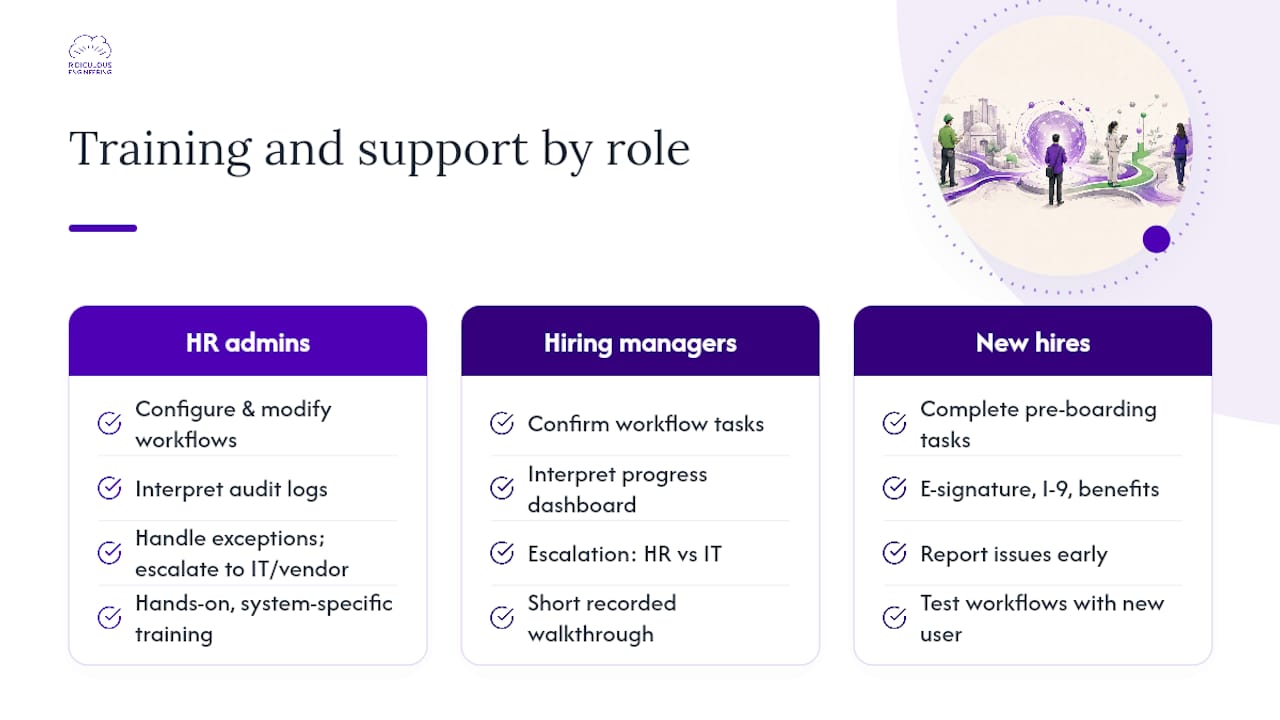
HR administrators need to understand how to configure and modify workflows, interpret audit logs, handle exceptions (a new hire who can’t complete their I-9 remotely, for example), and escalate platform issues to IT or the vendor. This is hands-on, system-specific training, not a one-hour overview. Budget for it during the pilot phase, not after go-live.
Hiring managers need a narrower but equally important set of skills: how to confirm their tasks are complete in the workflow, how to interpret the new hire’s onboarding progress dashboard, and when to contact HR versus IT when something looks wrong. A short recorded walkthrough and a one-page reference card covers most of what managers need.
New hires are users of the system too. The experience they have completing their pre-boarding tasks, from e-signature to I-9 to benefits enrollment, shapes their first impression of the organization. Test every new-hire-facing workflow with someone who has never seen the system before. Friction in the new-hire experience is a signal that the workflow needs redesign, not that new hires need more instructions.
Ongoing support means keeping workflows current as your HRIS, downstream apps, and compliance requirements change. Assign a named owner for each workflow. Schedule a quarterly review to check for broken integrations, outdated form versions, and new state withholding requirements. The skills and training resources context is also worth considering when designing what new hires actually learn during their first 30 days, particularly as automation shifts which skills matter most in early-career roles.
Ridiculous Engineering builds onboarding automation that fits your actual systems
Most onboarding automation projects stall not because the technology is hard, but because the integration map is more complex than the vendor demo suggested. Ridiculous Engineering works with HR and operations leaders to close that gap, building custom integrations, workflow logic, and automation layers that connect your real systems rather than the idealized versions in a sales deck.
A discovery audit with Ridiculous Engineering delivers:
-
A current-state process map showing every manual handoff and its downstream impact
-
An integration map of your HRIS, identity provider, LMS, payroll, and document management systems
-
A prioritized pilot backlog scored by impact and implementation effort
-
A security and compliance checklist covering I-9 workflow requirements, data residency, and access controls
-
A high-level cost estimate for pilot and full-scale implementation
The result is a clear, scoped plan you can take to leadership or hand directly to an engineering team. If you want Ridiculous Engineering to build it, we can do that too.
Start a discovery conversation with our team to scope your onboarding automation project.
Sources
The sources below back the claims in this article and are worth bookmarking for your own project requirements and compliance documentation.
-
Getting new hires up to speed quickly — MIT Sloan Management Review
-
Onboarding and retention whitepaper — Human Capital Institute
-
How to automate employee onboarding and offboarding — Zapier
-
Onboarding Automation: A Complete Introductory Guide — Workato
FAQ
What is automated onboarding?
Automated onboarding uses software to trigger and complete repeatable HR tasks, such as document routing, account provisioning, and training enrollment, based on a hire event in your HRIS, without requiring manual action for each step.
What are the 4 C’s of employee onboarding?
The 4 C’s framework covers Compliance (legal and policy requirements), Clarification (role expectations and goals), Culture (organizational norms and values), and Connection (relationships with colleagues and managers). Automation handles Compliance and Clarification tasks well; Culture and Connection require human-led activities.
How can you gamify employee onboarding?
Gamification in onboarding typically involves progress bars, completion badges, and point systems within your LMS or onboarding platform to encourage new hires to complete tasks and training modules. It works best when tied to milestone check-ins at 30, 60, and 90 days rather than applied to compliance-critical steps like I-9 completion.
How long does an onboarding automation pilot typically take?
A focused pilot covering one or two workflows, such as I-9 routing and account provisioning, typically takes three to four weeks from configuration to first live hire cohort, assuming your HRIS has a native connector to the tool you’re using.
When should you build custom onboarding automation instead of buying a packaged tool?
Build custom when your HRIS or downstream systems lack modern APIs, when your compliance requirements exceed what standard tools support, or when data residency rules prevent storing employee PII in a third-party SaaS environment.