Kubernetes Cost Optimization: A 2026 DevOps Guide
Kubernetes Cost Optimization: A 2026 DevOps Guide Kubernetes cost optimization is the practice of reducing cloud infrastructure waste while maintaining reliability by right-sizing resources, automating scaling, and using discounted compute options.
Kubernetes cost optimization is the practice of reducing cloud infrastructure waste while maintaining reliability by right-sizing resources, automating scaling, and using discounted compute options. The core problem is structural: Kubernetes bills based on pod resource requests, not actual usage, so clusters stay expensive even during low traffic. Average CPU utilization in production clusters runs at just 8–12% of provisioned capacity, meaning most teams are paying for idle compute every hour of every day. The good news is that teams applying rightsizing, autoscaling, and Spot instance strategies consistently achieve 30–60% reductions in Kubernetes spend, with many seeing meaningful savings in the first month alone.
How does rightsizing pod resource requests drive Kubernetes cost savings?
Rightsizing is the single most powerful lever in any cost reduction effort. Kubernetes schedules pods based on their declared resource requests, not what they actually consume. A pod requesting 2 CPU cores reserves that capacity on a node, regardless of whether it uses 0.2 cores at runtime. This gap between requests and actual usage is where most budget waste hides.

The practical fix is to set requests at the 99th percentile of historical usage plus 20% headroom. One to two weeks of monitoring gives you enough signal to identify the delta between what pods request and what they actually consume. That delta is often a 3x to 8x overestimate, which means your cluster could be running on a fraction of its current node count.
Key practices for safe rightsizing:
-
Audit first. Pull actual usage metrics from Prometheus or your cloud provider’s native monitoring before changing any requests.
-
Use Vertical Pod Autoscaler (VPA) in recommendation mode. VPA analyzes historical usage and suggests right-sized values without automatically applying them, giving you control before committing.
-
Set memory limits carefully. Memory OOMKill events crash pods, so keep memory limits slightly above requests rather than equal to them.
-
Avoid setting CPU requests equal to CPU limits. CPU throttling under limits causes latency spikes without crashing the pod, making it harder to detect.
-
Iterate in staging first. Apply new request values to non-production workloads, measure stability for a week, then roll out to production.
Real-world results validate this approach. Case studies show monthly bills dropping from $52,000 to $23,000 and from $85,000 to $34,000 within a few months of rightsizing combined with autoscaling. The savings are not theoretical.
Pro Tip: Never set CPU requests equal to CPU limits in production. Throttling is silent and degrades performance without triggering alerts, making it one of the most common hidden causes of latency in Kubernetes workloads.
What autoscaling strategies optimize workload elasticity?
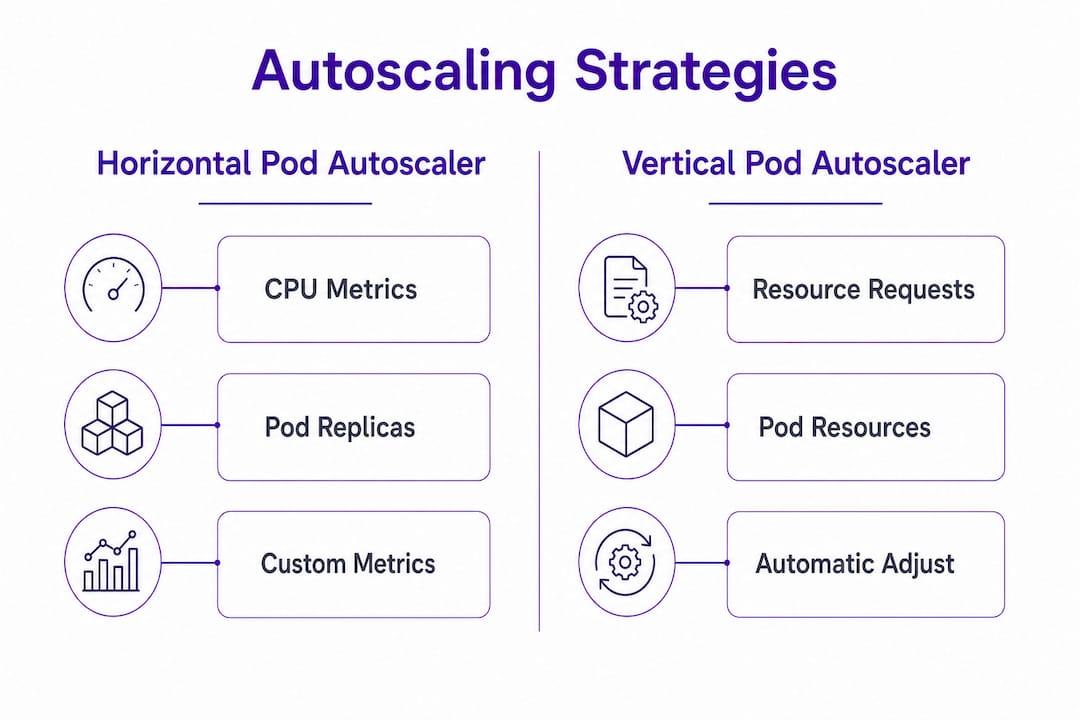
Static resource allocation is the enemy of cost efficiency. Autoscaling replaces fixed capacity with dynamic capacity that tracks actual demand. Three tools cover the full range of scaling needs: the Horizontal Pod Autoscaler (HPA), the Vertical Pod Autoscaler (VPA), and KEDA (Kubernetes Event-Driven Autoscaler).
HPA scales pod replicas horizontally based on CPU or custom metrics. VPA adjusts individual pod resource requests vertically over time. KEDA extends HPA to support event-driven scaling from sources like Kafka, SQS, or HTTP request queues, and critically, it supports scale-to-zero for workloads that can tolerate cold starts. Separating concerns across these three tools gives teams precise control: VPA handles memory sizing, HPA handles CPU-driven replica counts, and KEDA handles event-driven burst and idle patterns.
Node provisioning is where the biggest infrastructure savings appear. Karpenter reduces compute waste by 15–30% compared to the older Cluster Autoscaler by dynamically selecting the most cost-efficient instance types across thousands of options. Karpenter also supports automated node consolidation, which bin-packs workloads onto fewer nodes and terminates underutilized ones. This is the mechanism behind the largest documented cost reductions. For teams managing high-traffic scaling events, combining Karpenter with HPA creates a system that scales out fast and scales back down aggressively.
Autoscaling best practices worth implementing immediately:
-
Configure HPA scale-down stabilization windows to 5–10 minutes rather than the default 5 minutes to avoid flapping, but set scale-up to respond within 60 seconds.
-
Use Karpenter consolidation policies to automatically replace oversized nodes with smaller, cheaper ones during low-demand periods.
-
Set KEDA triggers to scale batch jobs to zero between runs, eliminating idle pod costs entirely.
Pro Tip: Configure HPA with aggressive scale-down behavior by setting scaleDown.stabilizationWindowSeconds to 300 and percentPod policies to remove 50% of excess pods per minute. This alone can cut off-peak compute costs by 20–40% for variable workloads.
How can spot instances and architecture changes amplify savings?
Infrastructure-level choices compound the savings from rightsizing and autoscaling. Spot instances provide 60–90% savings over On-Demand pricing, making them the most impactful pricing lever available. The catch is interruption risk. Spot instances can be reclaimed by the cloud provider with two minutes’ notice, so workload selection matters.
Stateless workloads, batch jobs, and CI/CD runners are ideal Spot candidates. Stateful workloads, databases, and anything requiring persistent connections should stay on On-Demand nodes. Implement Spot safely by combining pod disruption budgets with node tolerations that target Spot node pools. Karpenter handles Spot fallback automatically, switching to On-Demand when Spot capacity is unavailable.
| Optimization | Estimated Savings | Implementation Complexity |
|---|---|---|
| Spot instances (stateless workloads) | 60–90% on eligible compute | Medium |
| Graviton ARM processors | ~20% cost reduction | Low to Medium |
| gp3 EBS volume migration | ~20% storage cost reduction | Low |
| Consolidated ingress controllers | Variable, reduces load balancer count | Low |
| NAT gateway VPC endpoints | Reduces data transfer charges | Low |
Migrating to ARM-based Graviton instances yields approximately 20% lower costs with comparable or better performance for most workloads. Karpenter can target Graviton automatically when you specify ARM as a preferred architecture in your NodePool configuration. Migrating from gp2 to gp3 EBS volumes cuts storage costs by approximately 20% with zero downtime, since the migration happens online. These are low-effort changes with guaranteed returns.
Networking costs are frequently overlooked. NAT gateway data transfer charges accumulate quickly in clusters with heavy egress. Adding VPC endpoints for services like S3 and ECR routes traffic privately, bypassing NAT entirely. Consolidating multiple ingress controllers into a single shared controller also reduces the number of cloud load balancers provisioned, which directly lowers monthly fixed costs.
What governance practices sustain Kubernetes cost optimization?
Technical optimizations decay without governance. Teams revert to over-provisioning when there is no visibility into who owns what spend. Cost allocation through showback and chargeback gives engineering teams direct line of sight to the cost of their workloads, which changes behavior more reliably than any policy document.
The foundation is consistent labeling. Every namespace, deployment, and persistent volume should carry labels for team, environment, and cost center. Enforcing labeling with admission controllers like OPA Gatekeeper or Kyverno prevents unlabeled resources from being created in the first place. Without enforcement, label coverage degrades over time as teams move fast and skip tagging.
Governance practices that sustain savings:
-
Run weekly cost reviews using OpenCost or Kubecost to surface namespace-level spend trends.
-
Set budget alerts at the namespace level so teams receive notifications before overspending, not after.
-
Schedule monthly cleanup of orphaned PersistentVolumeClaims, idle namespaces, and stale ConfigMaps.
-
Assign a FinOps champion per team to own cost metrics alongside reliability metrics.
Cultural change is as important as technical tuning. Embedding cost accountability into sprint reviews and engineering OKRs sustains long-term savings. Teams that treat cloud spend as a shared engineering metric, not a finance problem, consistently outperform those that treat optimization as a one-time project. The engineering culture dimension of DevOps is where durable cost discipline lives.
Pro Tip: Start with showback before chargeback. Showing teams their costs without billing them first builds awareness and buy-in. Chargeback without context creates friction and resistance rather than ownership.
Key Takeaways
Effective Kubernetes cost optimization requires rightsizing resource requests first, then layering autoscaling and discounted compute, and finally embedding governance to prevent waste from returning.
| Point | Details |
|---|---|
| Rightsize pod requests first | Set requests at P99 usage plus 20% headroom; use VPA in recommendation mode before applying changes. |
| Autoscale at every layer | Combine HPA, VPA, KEDA, and Karpenter to match capacity to demand dynamically. |
| Use Spot and Graviton instances | Spot saves 60–90% on eligible workloads; Graviton cuts compute costs by approximately 20%. |
| Enforce labeling and allocation | Use OPA Gatekeeper or Kyverno to mandate labels; run showback reports to build team accountability. |
| Measure before you cut | Establish cost visibility with OpenCost or Kubecost before making any infrastructure changes. |
What I’ve learned from real Kubernetes cost work
The most common mistake I see teams make is jumping straight to Spot instances or load balancer consolidation before fixing their resource requests. Those are real savings, but they are multipliers on a broken baseline. If your pods are requesting 4x what they use, Spot pricing on those pods still leaves most of the waste intact.
The sequence matters: visibility first, then rightsizing, then pricing optimization. Teams that follow this order consistently achieve larger and more durable reductions than teams that chase quick wins out of order. I have watched organizations cut their bills in half within 90 days by following this sequence, and I have watched others spend months on Reserved Instance negotiations while their clusters ran at 10% utilization.
The harder problem is organizational. Engineers do not over-provision out of carelessness. They do it because they are measured on reliability, not cost. Until cost appears in the same dashboard as uptime and latency, it stays invisible. The teams that sustain savings are the ones that make cost a first-class engineering metric, reviewed in the same meeting where they review SLOs. That shift is harder than any Karpenter configuration, and it matters more.
— Paul CEO
Ridiculousengineering can help you cut Kubernetes costs
Kubernetes cost reduction is a technical and organizational challenge. Getting it right requires accurate workload analysis, well-designed automation, and governance systems that hold up under real engineering team pressure.
Ridiculousengineering works with IT managers and DevOps teams to design and build the cloud infrastructure, automation, and governance tooling that makes cost efficiency stick. From rightsizing analysis to custom cloud architecture and DevOps services, the team brings both the technical depth and the organizational experience to move your Kubernetes spend in the right direction. If your cluster bills are not reflecting your actual workload, that gap is worth closing.
FAQ
What is the fastest way to reduce Kubernetes costs?
Rightsizing pod resource requests delivers the fastest savings. Teams commonly see 20–30% reductions in the first month by aligning requests to actual usage and removing idle workloads.
How does Karpenter differ from Cluster Autoscaler?
Karpenter provisions nodes dynamically across thousands of instance types and supports automated consolidation, reducing compute waste by 15–30% compared to Cluster Autoscaler’s static node group approach.
Are Spot instances safe for production Kubernetes workloads?
Spot instances are safe for stateless workloads, batch jobs, and CI/CD runners. Stateful workloads and databases should stay on On-Demand nodes to avoid disruption from Spot reclamation events.
What tools provide Kubernetes cost visibility?
OpenCost and Kubecost are the leading open-source and commercial options for namespace-level cost allocation. Both integrate with Prometheus and support showback and chargeback reporting.
How do labels and admission controllers reduce Kubernetes waste?
Consistent labels enable accurate cost attribution by team and environment. Admission controllers like OPA Gatekeeper or Kyverno enforce labeling at resource creation, preventing unlabeled and untracked resources from accumulating.